Last updated: November 20, 2026
Quick answer: you can usually narrow an APK search in 3 checks. If you have the Android package name, you can usually find the right APK listing by searching that exact identifier, checking the developer name, and matching the app icon or version wording before you tap a download. This guide is about How to Find APKs by Package Name When You Do Not Know the App Name, and it uses that phrase consistently.
Key takeaways
- The package name is the app’s technical ID, not the store title.
- A package name search works best when you use quotes and keep the string exact.
- The developer name and app icon help separate the real listing from copycat pages.
- Search results can look messy because many APK sites reuse the same 3-word labels.
- If the package name is incomplete, search in pieces instead of guessing the app title.
How do I find APKs by package name?
You find APKs by package name by searching the exact Android package identifier, then matching the listing against the developer name, app icon, and version details. The package name often appears as a dot-separated string such as com.example.app, and that string is often the best way to locate the right APK when the app title is unknown or misleading.
Start with the package name itself, not the store name. Many APK listings rename the app, shorten the title, or add a region tag, but the package identifier stays tied to the app’s Android build. That makes it the most reliable clue when you only have a technical ID from a log, a device screen, or a file name.
The hard part is that a package name by itself may return 10 or more look-alike pages. That is normal. The fix is to search more precisely and compare the listing details before you download anything.
What should I search first?
You should search the full package identifier first, then trim it only if the result set is empty. Use the exact string in quotes, such as "com.company.app", because search engines and APK sites often treat dots and spaces differently; if you are unsure, consult a professional or the APK site’s support team. Google’s search help explains quoted searches here: https://support.google.com/websearch/answer/2466433
If the full string returns nothing, try the package name plus one of these 3 hints:
- the developer name
- the app icon color or shape
- a known version or build word
For example, a search like "com.company.app" APK developer name is usually more useful than just pasting the package name alone. The first query tries to match the identifier exactly; the second gives the search engine one extra clue without forcing you to know the app title.
Avoid broad searches such as APK app or download apk unless you are stuck. Those phrases pull in the wrong listings fast, and you end up sorting through pages that have the same 2 or 3 generic words in the title but no connection to your package.
Which clues help match the right listing?
The developer name, app icon, and package string together are the quickest way to confirm the right APK listing. If any one of those 3 clues is missing, the result is less trustworthy.
Use this comparison before you click:
| Clue | What it tells you | What can go wrong |
|---|---|---|
| Package name | The exact Android identifier | A clone may copy a similar string |
| Developer name | Who published the build | Resellers may repost it under a new label |
| App icon | Visual match for the app | Icons can be reused or changed in updates |
| Version text | Which build the APK page carries | Older pages may list stale builds |
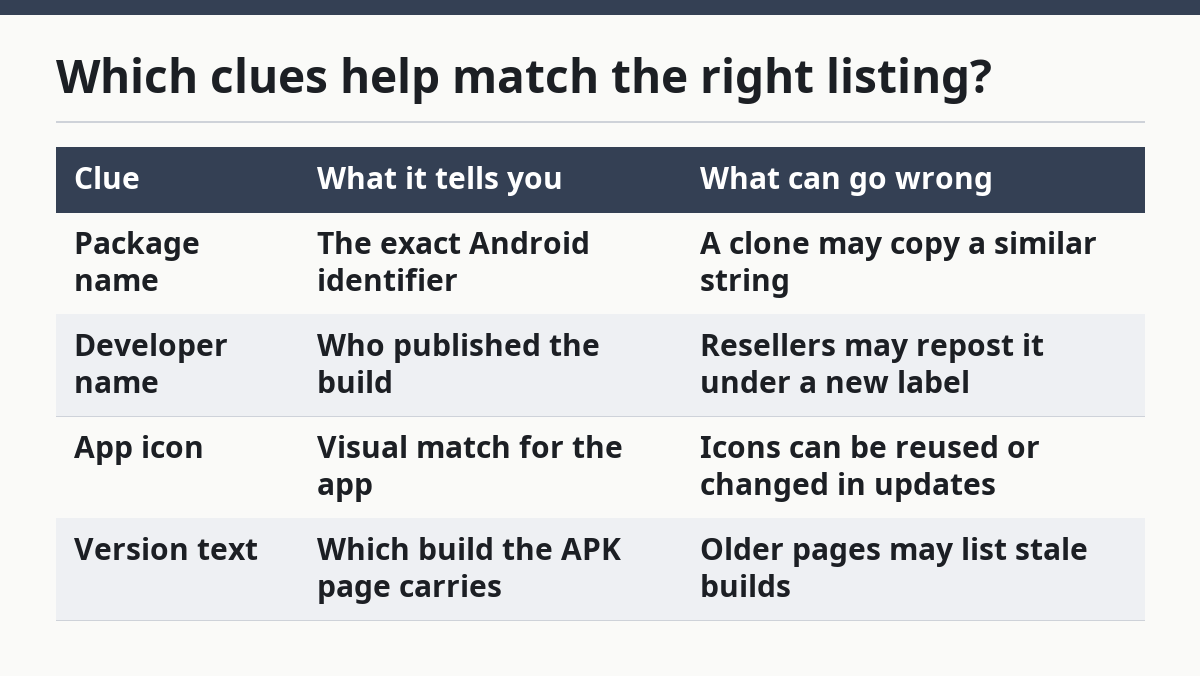
A good listing usually matches all 4 clues, not just one. If the package name matches but the icon looks wrong, pause. If the icon matches but the developer name does not, pause again. A single clue is not enough when you are hunting by package identifier.
This matters because APK mirrors often index the same app in separate pages for different variants, such as arm64, nodpi, or older build numbers. Those labels can be useful, but they can also hide a bad match if you only skim the title line.
How do package names help find the right APK listing?
Package names help because they are the most stable search key across stores, mirrors, and device records. A title can change, but the package identifier usually stays the same for the app family.
Use that identifier in 3 places:
- Search engines — Put the full package name in quotes, then add
apkif needed. - APK mirrors — Paste the identifier into the site search box or search bar.
- File pages and changelogs — Compare the package string against the listing details before downloading.
The package name also helps when the app has a generic title like “Photo Editor” or “File Manager.” Those names are too common to search on their own. A package identifier cuts through that noise and points you toward the one listing tied to that Android app.
A practical rule helps here: if the title has fewer than 4 unique words, trust the package name more than the app name. Generic titles are common, but package strings are specific.
How do I search when the package name is incomplete?
You search in parts when the package name is incomplete, then use the remaining clues to narrow the result. A partial string like com.company is still useful if the last part is missing, but it is much less exact than the full 2- or 3-part identifier.
Try these steps in order:
- Search the full string in quotes.
- Search the first 2 segments of the package, such as
com.company. - Add the developer name if you know it.
- Add the word APK only if the results are too broad.
- Compare the app icon against the listing image.
This works because many Android package names share the same prefix. A company can publish several apps under com.company, so the first 2 segments may point to more than one result. That is still useful, but it means you need one more clue before you choose a page.
If the package name came from a log file, a settings screen, or an APK filename, copy it exactly. One missing dot or one extra space can send you to a different app family.
What are the most common mistakes?
The most common mistakes are using the app title, trusting the first result, and ignoring the developer name. Each one costs time, and the first one can cost you the wrong APK entirely.
Here is what usually goes wrong:
-
Using the app name instead of the package name
Cost: you get dozens of unrelated results.
Better move: search the exact identifier first. -
Clicking the first APK page
Cost: you may grab the wrong build or a clone.
Better move: compare the package string and developer name. -
Skipping the app icon check
Cost: you miss obvious mismatches.
Better move: confirm the icon before download. -
Treating a partial package as final
Cost: you may confuse sibling apps under the same prefix.
Better move: add one more clue, such as the developer name or version word. -
Ignoring the APK listing wording
Cost: you may install an old or variant build by accident.
Better move: look for the exact identifier inside the page text, not just the headline.
The honest trade-off is simple: package-name search is more precise than app-name search, but it asks more of you. You must match small details. That extra step is the price of getting the right APK when the app name is unknown.
Which search tools work best?
A search engine is best for the first pass, while an APK listing search box is best for the second pass. Search engines are faster for broad discovery, but APK sites are better once you already have the package identifier.
Here is the trade-off in plain terms:
| Tool | Best use | Weak point |
|---|---|---|
| Search engine | Find possible APK pages fast | Too many unrelated results |
| APK site search | Find exact package matches | Only useful if the site indexes that app |
| Browser find on page | Check a long listing page for the package string | Only works after you open a page |
If you already know the package name, the site search box often saves the most time. If you only have part of the identifier, a search engine can help you discover the full string from a page snippet or a mirror listing.
When results are messy, search with quotes, then add one specific term at a time. That is better than adding 5 words at once, because you can tell which clue actually changed the result set.
Which package-name details matter on Android?
The Android package name matters because it is the app’s technical identity, not a marketing label. In Android documentation, the package and application identifier are tied to how the system recognizes the app, which is why the same app can appear under a different title while keeping the same underlying ID.
The Android Developers documentation for the manifest element and application ID explains this naming structure:
https://developer.android.com/guide/topics/manifest/manifest-element
https://developer.android.com/studio/build/application-id
Those pages are useful when you want to understand why two APK pages can look different but still point to the same package family. The title can change, but the package string remains the anchor.
This is also why package-name searches are strongest on Android and weaker on plain brand names. A brand name can belong to 2 apps, a clone, or a region-specific build. A package identifier is narrower and usually more dependable for matching.
When should I stop and double-check?
You should stop and double-check any time the package name matches but the developer name, icon, or version text does not. That mismatch is the signal that you may be looking at the wrong APK listing, a mirror copy, or an older build page.
Use a 3-point check before downloading:
- The package name appears exactly as expected.
- The developer name matches the app family or publisher.
- The app icon looks like the one tied to the app.
If one of those 3 is off, keep searching. A bad APK page can look close enough to pass a quick glance, especially when the title is generic and the page is built around one short package string.
The safer habit is to trust the full match more than the first match. That rule matters more when the app name is unknown, because you do not have a title to rescue you if the listing is wrong.
Where do i find an android package name
You usually find an Android package name in the app’s settings, the app list, a file name, or a device log. It often appears as a dot-separated string such as com.company.app, not as a plain store title.
If you only have a screenshot or a shortened label, look for any text with dots and a developer-style prefix. That is often the clue you need before you search for the APK.
Can I search for an apk without the app name
Yes, you can search for an APK without the app name if you have the package name or another stable clue. The package identifier is often enough to find the right listing, especially when you add the developer name or app icon as a second check.
Without the app name, the search is more exact but also more work. You need to compare small details instead of relying on a familiar title.
How do package names help find the right apk listing
Package names help by giving you a fixed Android identifier that stays tied to the app family across listings and mirrors. That makes it easier to spot the right APK page even when the title is vague, repeated, or translated.
The package string, developer name, and app icon together form a better match than the app name alone. If those 3 do not line up, the listing is not a safe choice.
FAQ
What is the fastest way to find an APK by package name?
The fastest way is to search the full package string in quotes, then add APK or the developer name if the result list is too broad. That 2-step search usually works better than searching the app title.
Why does the same package name show different APK pages?
The same package name can show different pages because mirrors separate builds by version, architecture, or density. You may see 2 or 3 variants for one app family.
What if the package name only matches part of the listing?
If only part of the package name matches, keep searching. A partial match can point to sibling apps under the same prefix, so you should confirm the developer name and icon before downloading.
Is it safe to trust the first result?
Not always. The first result can be a clone, an older build, or a mirror page with a similar title, so compare the package string and developer name first.
Do I need the app name at all?
No. The app name helps, but the package name is usually the better search key when you do not know the app name.
Drafted with AI; not yet reviewed by a person.