Last updated: November 20, 2026
Quick Answer: use 4 checks — publisher, package name, version code, and listing history — to spot the original APK listing when a site shows duplicate copies. When a site shows duplicate copies, start by comparing those four details before you tap anything else. In this guide on How to Spot the Original APK Listing When a Site Shows Duplicate Copies, the safest rule is to compare the metadata, not the design.
Key takeaways
- The original listing is the one that best matches the publisher account, not the one with the biggest image or boldest title.
- The app package name matters because it ties the listing to one Android app, even when the page title changes.
- A newer-looking page can still be a copy if its version code or release date does not line up with the app’s history.
- Duplicate pages often differ only in formatting, tags, or upload date, so the clues are in the metadata.
- If two pages disagree on publisher or package name, treat them as separate listings until the details line up or a qualified reviewer or the site’s documentation confirms the match.
What makes one APK listing the original?
The original APK listing is the page that matches the app’s own identity most closely, not the page that looks newest or most polished. In practice, that means checking the publisher account, app package name, version code, release date, and the page’s listing history before you trust a duplicate copy.
A lot of sites create two or more pages for the same app because of category pages, reposts, or cleanup mistakes. That creates confusion fast, especially when both pages show the same icon and title. The original listing usually carries the full record first: the earliest release date shown on the site, the most consistent publisher name, and the version trail that makes sense across updates.
If a page says one thing in the title but another in the metadata, the metadata wins. A title can be rewritten in minutes; a package name like com.example.app is the stronger identity marker because it is tied to the Android app itself. Google’s Android documentation on app identity and versioning is useful here, especially the developer pages on app versioning and app signing. For a broader check, see APK signing and version checks and how package names identify Android apps.
Therefore, this approach is not for someone trying to find a mirror copy of a file host. It is for a reader standing on one site, looking at duplicate APK listing pages, and trying to decide which page is the canonical one.
Which clues matter first?
The publisher account matters first because it tells you who is supposed to own the listing. If one page is tied to a known publisher name and the duplicate is not, the unnamed page is usually the weaker candidate.
The app package name comes next because it stays steadier than the page title. Two pages can both say “Chat App” or “Pro Cleaner,” but only one should point to the same package name for the same Android app. If the package name changes, you may be looking at a clone, a rebrand, or a different build.
Version code is one of the quickest ways to catch a copy that looks current but is not. Android uses version code as a numeric update marker, so a page that claims an older release date but shows a higher version code is worth a second look. The release date should line up with that version history, not fight it.
Listing history matters because original pages often show a fuller trail of edits, uploads, or update dates. A copied page may have a shorter history, missing older versions, or a date that looks pasted in. If the page history is thin, the page may still be useful, but it is a weaker candidate for the original listing.
How do I check a duplicate APK listing step by step?
You check a duplicate APK listing by comparing the page identity fields in the same order every time: publisher, package name, version code, release date, then page history. That order keeps you from guessing based on layout or thumbnail size.
-
Open the page and read the listing title, publisher name, version code, and release date on the first screen.
Look for the fields that stay specific, not the sales copy or tag line. If the page hides those details behind extra clicks, treat that as a warning sign rather than proof; if needed, consult the site’s help pages or a qualified Android reviewer. -
Compare the package name against the other duplicate page.
The package name should match exactly, character for character, including dots and letters. If one page sayscom.company.appand the other sayscom.company.app2, you are not looking at the same APK listing copy. -
Check the publisher account on both pages.
A matching publisher name is a strong signal, while a missing or altered publisher is a weak one. If the site shows an account page, use that instead of trusting the title alone. For a deeper check, compare it with publisher and account matching for APK pages. -
Match the version code with the release date.
A higher version code should not sit under a release date that makes no sense for the update sequence. If the duplicate page looks newer but lists an older version code, the page may be a repost rather than the original listing. -
Read the listing history for signs of a first post or update trail.
The original page often has the most complete update path, while a duplicate page may show only a recent import. If the history is short, use that as a clue, not as a final answer. -
Pick the canonical listing only after the other four fields agree.
When publisher, package name, version code, and release date all line up, the page is usually the better canonical listing. If even one of those fields clashes, keep comparing instead of clicking the first page that looks clean.
This process is boring on purpose. Duplicate APK pages are messy, and a method with a fixed order is better than one based on hunches.
Why do duplicate pages fool people?
Duplicate pages fool people because they copy the parts that look official and hide the parts that prove identity. A duplicate can reuse the app icon, the app name, and even part of the description, so the eye goes to the same place every time.
The trap is that a copied page can still look more current than the original. A fresher theme, a newer upload stamp, or a cleaner layout does not mean the page is canonical. If the version code does not fit the version history, the page is probably only a copy with a nicer coat of paint.
Another common mistake is trusting the first page in the search results inside the site. Search order is not identity. A duplicate page may rank higher because it was updated recently or tagged in a broad category, while the original listing sits one click deeper.
This is why a page with a strong publisher match and a stable package name should beat a page with better visuals. It is also why a duplicate that hides the version code should make you slow down. The page may still be fine, but it is not the page I would trust first. For an extra layer of verification, compare the page against APK versioning basics and the official Android app versioning documentation.
Original listing or copy: what should I compare?
The original listing or copy decision comes down to a small set of fields that should agree with each other. If they do not agree, the page is probably a duplicate copy or a republished page.
| Field | Original listing usually shows | Copy often shows |
|---|---|---|
| Publisher account | The same named account across updates | A missing, shortened, or altered name |
| App package name | Exact match across the duplicate pages | A changed suffix or a different package |
| Version code | Fits the update order | Looks out of sequence |
| Release date | Matches the version history | Feels pasted in or too recent |
| Listing history | Longer trail of updates or edits | Short, thin, or absent history |
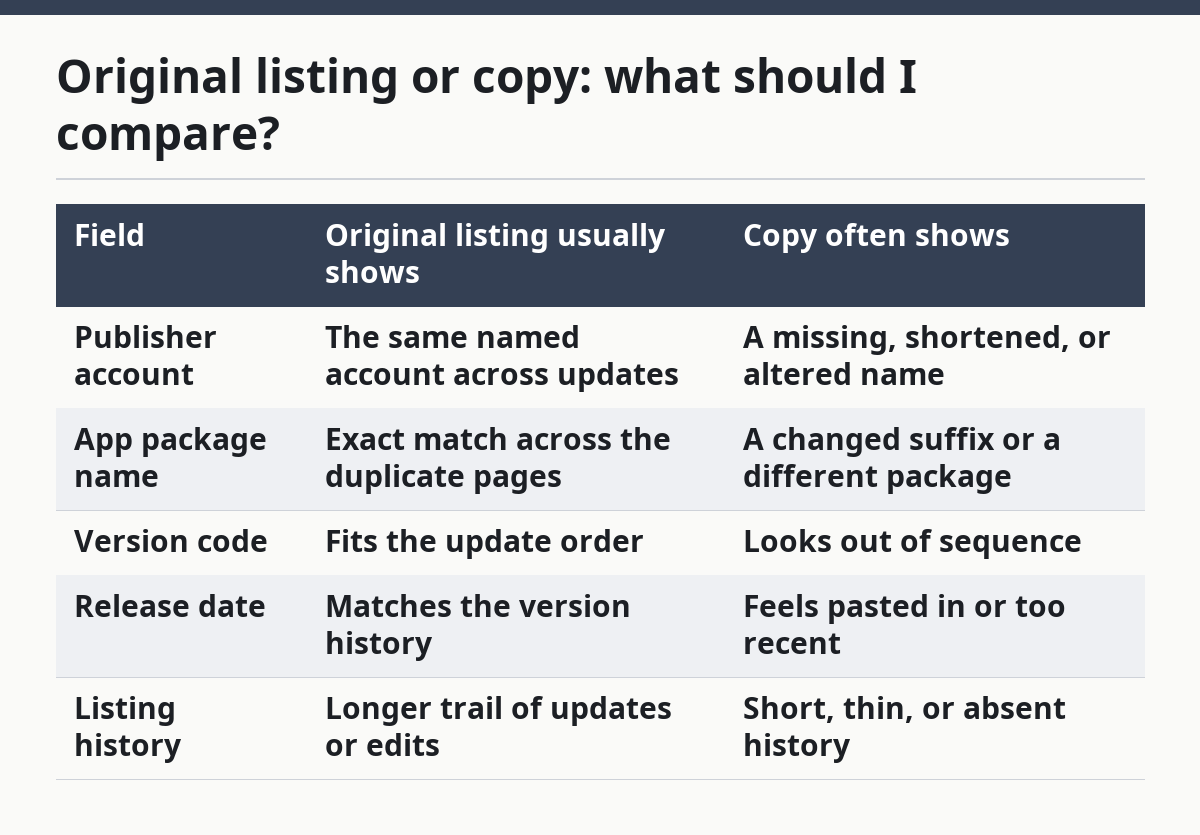
A page does not need to win every row to be useful, but it should win the rows that matter most: publisher, package name, and version code. If those three do not line up, I would not call the page original.
The trade-off is simple. A page with clean formatting can still be a copy, while an ugly page with better metadata may be the original. That is why the metadata comes first and the design comes last.
What should I do when two pages still look the same?
When two pages still look the same, I treat the one with the stronger history as the canonical listing and leave the other one alone. If the publisher, package name, version code, and release date all match, the deciding clue is usually the listing history or the way the site groups updates over time.
At that point, look for older timestamps, older release notes, or a clearer update trail. A page that has been on the site longer often carries the cleaner history, while a duplicate may have been imported later. That does not make the later page wrong in every case, but it makes it a weaker source for identity.
If the site gives both pages the same date and the same package name, do not force a choice based on design. Choose the page with the better history and the better publisher match, and ignore the page that only looks more official. That is the point where the original listing is more about record quality than appearance. If the match is still unclear, consult a qualified Android professional or the site’s own documentation before you install anything.
This method is not for readers who only want the fastest click; it is for readers who want the right APK listing before they install anything on a Samsung phone. If the site keeps duplicating the same app, use the hub on APK download sources and mirror discovery as the wider map, then return to the page-level clues here. You can also compare the result with APK mirror vs original listing checks.
Why do apk sites show the same app more than once?
APK sites show the same app more than once because the same listing can be reposted, recategorized, or copied into a new page structure. A site may also create duplicate pages during cleanup or import work. The result is usually two pages with the same icon and title but different metadata.
How can i tell which apk listing is original?
You can tell which APK listing is original by checking the publisher account, app package name, version code, release date, and listing history in that order. The original page usually has the cleanest match across those fields. If one detail breaks the pattern, the page is probably a copy or a repost.
What makes one apk listing the canonical page?
One APK listing becomes the canonical page when it has the strongest identity match and the clearest update trail. That usually means the publisher name, package name, and version code all line up with the same release history. If a duplicate page looks newer but the metadata does not fit, the newer page is not the canonical one.
Drafted with AI; not yet reviewed by a person.