Last updated: November 20, 2026
Quick Answer: the real APK source behind a mirror page is usually the original listing page that first names the app, publisher, and package name, while the mirror page repeats that information and sends the download to a separate host. In How to Find the Real APK Source Behind a Mirror Page, start by matching the app package name and publisher name across both pages, then check whether the download host path and file name point back to the same listing or to a copied page with different ownership details.
Key takeaways
- A mirror page can copy the app details without being the original source.
- The package name is often the most stable clue, but it should still be checked against the other listing details.
- Publisher name matters as much as the app title; titles get reused, publishers should not.
- The download host path often shows whether the file lives on a mirror network or on the page that first published the listing.
- If the page gives conflicting source clues, do not treat it as the real source until the listing page matches too; if you are unsure, consult a professional and verify against the Android package guidance from Google: https://developer.android.com/guide/topics/manifest/manifest-element
What makes a mirror page “real” source material?
A real source page is the page that first ties together the app package name, the publisher name, and the listing page details. A mirror page may still be useful, but it is not the source if it simply repeats another listing and sends the file to a different host.
The clue most readers miss is that source identity is not the same as file availability. A mirror can hold the same APK, the same version number, and the same 1 file link, yet still not be the original listing page. That means the question is not “does this page have the app?” but “which page owns the listing relationship?”
The terms matter here. The app package name is the fixed identifier that Android uses for the app. The publisher name is the developer or company name shown on the listing page. The download host is where the APK file is actually served from. The listing page is the page that describes the app before the download starts. A mirror page can copy all four fields, but that alone does not prove it is the first source.
For Android package identity, the official Android Developers documentation is a useful reference point: https://developer.android.com/guide/topics/manifest/manifest-element#manifest-element-package
How do I trace the source in 4 steps?
You trace the source by matching the package name, publisher name, listing page wording, and download host in that order. Each step cuts down the number of pages that can claim to be the original.
-
Open the listing page and read the package name. Look for the exact Android package string, not just the app title, because titles can change while the package name usually stays fixed.
-
Compare the publisher name on both pages. If the mirror page lists a different publisher, or leaves it out, that page is less likely to be the original source.
-
Inspect the download host path. A file path that points to a separate host or mirrored subdomain often shows that the page is duplicating another listing instead of hosting the source page itself.
-
Check the listing page for the same app version and file name. If the version number or APK file name differs, the mirror page may be pointing to a newer or older copy than the page it claims to mirror.
This 4-step check works because it follows the chain from identity to hosting. It does not depend on page design or branding, which are easy to copy.
The Android package name concept is also explained in Android’s app manifest guidance: https://developer.android.com/guide/topics/manifest/manifest-element
Which clues point to the original listing page?
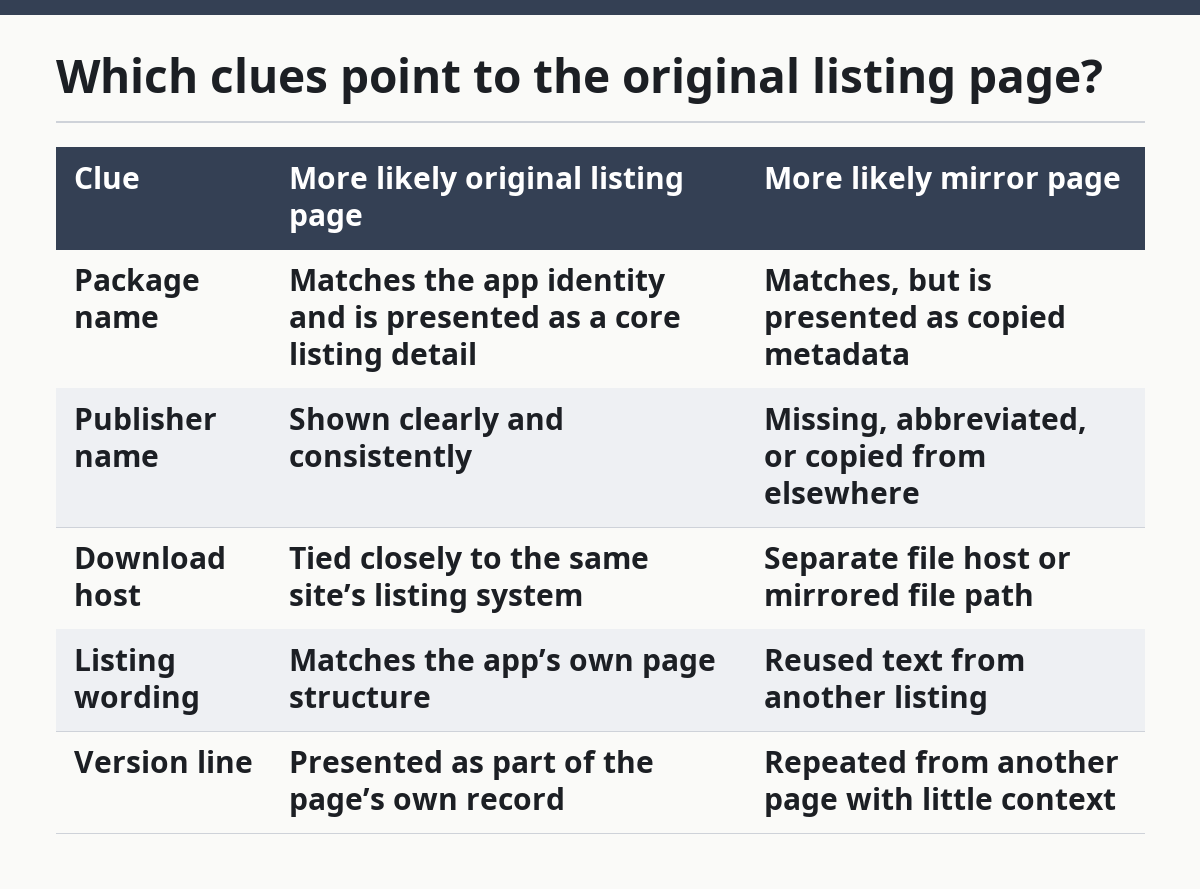
The original listing page usually shows consistent publisher attribution, a stable package name, and a clear listing history in one place. A mirror page often looks complete, but it may show copied text without owning the source chain.
| Clue | More likely original listing page | More likely mirror page |
|---|---|---|
| Package name | Matches the app identity and is presented as a core listing detail | Matches, but is presented as copied metadata |
| Publisher name | Shown clearly and consistently | Missing, abbreviated, or copied from elsewhere |
| Download host | Tied closely to the same site’s listing system | Separate file host or mirrored file path |
| Listing wording | Matches the app’s own page structure | Reused text from another listing |
| Version line | Presented as part of the page’s own record | Repeated from another page with little context |
A strong clue is duplication across more than one page. If 2 pages carry the same package name, same publisher name, same version string, and same screenshots, the deciding factor becomes the source relationship: which page appears to be the listing page and which one appears to be the copy. The page that gives you the cleanest path from app identity to file host is usually the one that controls the listing.
This is where a generic article often goes wrong. It treats matching content as strong evidence of origin, but that is only a starting point. Mirror duplication only shows that one page copied another; by itself, it does not prove which page came first or which one should be treated as the source page.
When does the download host matter more than the page design?
The download host matters more than the page design when the page title, layout, and screenshots all look copied but the file path tells a different story. A polished page can still sit on top of a download host that has no clear link to the original listing.
The reason is simple: page design is cheap to copy, while host paths and file naming often reveal the real source structure. A mirror page may keep the same app title and publisher name yet send the APK through a different host, or through a host path that does not match the listing page’s own structure. That mismatch is a red flag.
If the host path includes a mirror-specific folder, subdomain, or file wrapper, treat the page as a duplicate until proven otherwise, and if needed consult a professional before relying on it. If the host path and the listing page feel disconnected, the page may be useful for access, but it is not the safest answer to “where did this APK come from?” That matters more than a matching screenshot.
This is also the point where the page may be wrong for a reader who wants one clean source. If you need a single origin trail, a mirror page with a separate host is the wrong place to stop. It can point you toward a file, but not always toward the real source page. For broader checking, see the related guide on APK download sources and the note on mirror discovery.
What mistakes make people pick the wrong source?
People pick the wrong source when they trust the app title first, skip the publisher name, or assume the oldest-looking page is the original. Those mistakes can send you to a copy page that only appears authoritative.
A common error is reading only the app title. Titles are the least stable label on the page, and 2 pages can share the same title with different package names. Another error is trusting a 1-line “mirror” label without checking whether the listing page actually shows the same publisher and file path. For a tighter workflow, compare the page against APK listing checks and publisher verification.
A third mistake is confusing duplication with authority. If a page duplicates another listing page and repeats the same version number, that does not make it the source. It only means the copy was kept in sync. The real source page still has to earn that status through publisher attribution, package identity, and a believable download host path.
The honest limit is that a mirror page may not reveal everything. Some pages hide the chain behind short file names or extra redirects. When that happens, the safest judgment is not “this is the original,” but “this page copies a listing and does not prove source ownership.”
How do I decide if the mirror page is enough?
The mirror page is enough only when its package name, publisher name, and listing page details all align and you only need a duplicate copy, not the original source record. If you need the real source, the mirror page alone is not enough unless it clearly shows that same source trail.
A good rule is to ask whether the page answers 3 questions at once: what app is this, who published it, and where does the file come from. If one of those answers is weak, the page is only partly useful. A mirror page that gets the package name right but hides the publisher or download host does not fully identify the source.
If the page conflicts with itself, stop there. A mismatch between package name and title, or between publisher name and host path, is reason enough to treat it as a copied listing page rather than the real APK source. That is the right call for a reader who wants the source relationship, not just a working download link.
The best next step is to compare it against the app’s listing page and, if needed, use the cluster guide on APK download sources and mirror discovery for the wider source-finding process.
How do I tell if an APK mirror is the original source?
You tell by matching the app package name, publisher name, and listing page details across the mirror and the presumed original. If those 3 items align and the download host path also points back to the same listing structure, the mirror may be closely tied to the source. If the publisher or host differs, it is probably a copied listing, not the original source.
What clues show a mirror page is duplicating another listing?
A mirror page is duplicating another listing when the app title, version number, screenshots, and description look copied while the publisher attribution is thin or missing. The package name may still match, but the host path often gives away the copy by pointing to a separate download system. That combination shows duplication, not source ownership.
Can a mirror page link to the wrong file host?
Yes, a mirror page can point to a file host that does not match the original listing page. That mismatch is one of the clearest signs that the page is only a copy of another listing. If the host path and publisher name do not line up, do not treat the page as the real source without more checking. For a more formal reference, Google’s Android documentation on package identity and manifest structure is here: https://developer.android.com/guide/topics/manifest/manifest-element#manifest-element-package
Drafted with AI; not yet reviewed by a person.