Last updated: November 20, 2026
Check the APK file hash published by the sender, compare it with the hash of the file you downloaded, and only keep the file if both strings match exactly. An APK file hash is a checksum for one file, and SHA-256 is often the best choice when the publisher offers it; MD5 is older and weaker, but it can still appear on download pages.
Key takeaways
- A hash check tells you whether the APK file changed between upload and download.
- The hash must come from the publisher, not from the file you are already downloading.
- SHA-256 is the preferred checksum type in many cases; MD5 should be treated as a fallback, not a first pick, and if you are unsure, consult a professional or the publisher’s support notes.
- A single changed character means the file is not the same file anymore.
- If the hash does not match, do not install the APK until you get a clean copy.
How do I verify an APK file hash?
You verify an APK file hash by checking the publisher’s checksum, downloading the APK, and comparing the two values character for character. If the APK file hash matches, the file’s contents are intact; if it does not, the file may have been altered, truncated, or corrupted in transit.
The job is simple, but the order matters. You do not compute a hash first and then search for a matching web page later; that turns the check into a guess. Start with the publisher’s checksum, usually SHA-256 or MD5, and treat the published value as the standard for the file you expect to get. If you are unsure how the release is supposed to be verified, consult a professional or the publisher’s documentation, and cross-check it with the release page.
- Open the publisher page and find the checksum next to the APK filename, version, or download note.
- Copy the hash value exactly, including every letter and number, so you have a clean reference.
- Download the APK file from the same source and keep the filename unchanged if possible.
- Run a hash tool on the downloaded APK to generate a new checksum for that file.
- Compare the two hashes character for character and keep the file only if they match exactly.
That is the whole check. If the publisher offers SHA-256, use SHA-256; it is the current standard in NIST FIPS 180-4 and is the better choice for download integrity in many cases. MD5 still appears on older pages, but RFC 6151 notes that MD5 has known weaknesses, so it is a weaker signal when a better hash is available. The file name by itself does not prove anything, because two files can share a name and still contain different bytes. For broader APK safety guidance, see APK file safety and how Android app signing works.
Which hash type should I use for APK verification?
Therefore, SHA-256 should be your first choice for APK verification in most cases, and MD5 should only be used when SHA-256 is not offered. SHA-256 is part of the SHA-2 family described in NIST FIPS 180-4, while MD5 is an older checksum that still shows up on legacy download pages.
That difference matters in practice. If a publisher gives both, check the SHA-256 value and ignore the MD5 line unless you need it as a backup reference. If a page offers only MD5, the hash can still help you catch a broken download, but it gives you less confidence than SHA-256. If the page or release note is unclear, consult a professional or the publisher before you install anything.
| Hash type | What it tells you | Best use | Drawback |
|---|---|---|---|
| SHA-256 | Strong checksum for file integrity | Primary APK verification | Longer string to copy and compare |
| MD5 | Older checksum for file integrity | Legacy pages that do not offer SHA-256 | Weaker than SHA-256 |
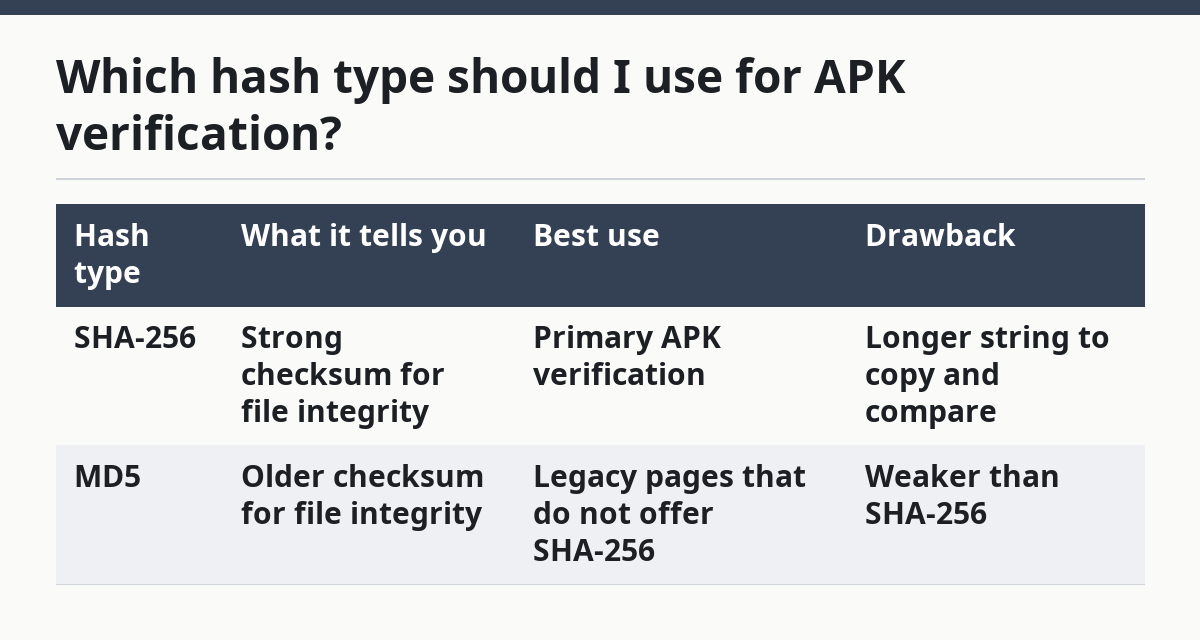
A common mistake is to treat MD5 and SHA-256 as equal because both look like a long string of letters and numbers. They are not equal in practice. For an APK file, SHA-256 should be the normal choice when the publisher gives you both options, and you can confirm the difference in the NIST standard and the MD5 guidance from RFC 6151.
Where do I find the hash before the download?
You find the hash on the publisher’s download page, in the release notes, or beside the APK file link. The checksum is often labeled SHA-256, SHA256, MD5, or checksum, and the string may be grouped for readability even though the actual value is one continuous code.
Do not trust a hash that appears only in a forum post, a random mirror, or a comment section. The hash needs to come from the same source that publishes the APK, because that source is the one claiming the file is authentic. If the page offers a text file with checksums, use that file only if it is clearly part of the same release.
A good page usually gives three things together: the APK filename, the version, and the checksum. That makes the match easier because you can see whether the hash belongs to the exact build you want. If you see multiple APK files on one page, each one should have its own hash. For more on checking the source before you install, see APK download safety tips.
What does a hash mismatch mean?
However, a hash mismatch means the APK file you downloaded is not the same file the publisher listed. One altered byte is enough to change the checksum, so a mismatch can point to a broken download, a bad mirror, or a file that was changed after the checksum was published.
Do not shrug off a mismatch and install the APK anyway. That is the moment to stop, delete the file, and get a fresh copy from the original source. If the publisher uses version numbers, check whether you grabbed the wrong release or an old APK with a similar name.
A mismatch does not tell you exactly why the file changed. It only tells you the file is not identical to the one the checksum was meant to protect. That is useful, because the whole point of a checksum is to catch silent changes before you install the APK on a Samsung phone.
What mistakes break APK hash checks?
So the most common mistakes are copying the wrong checksum, comparing the wrong file, and checking the file before it finishes downloading. Those mistakes waste time and can make a good APK look bad, or a bad APK look fine.
A tiny typing error is enough to ruin the comparison. One missing character, one extra space, or one line break from a copied page can make two values look different. File names can also mislead you if your browser saves a second copy with “(1)” or a version tag like “-2” added to the end.
Here is a quick comparison of what goes wrong and what to do instead:
| Mistake | What it costs | Better move |
|---|---|---|
| Copying the checksum with spaces or line breaks | A false mismatch | Paste into a plain text field and remove breaks |
| Comparing the hash to the wrong APK | Trust in the wrong file | Match the filename and version first |
| Starting the check before the download ends | A broken checksum | Wait until the file size stops changing |
| Using a mirror’s hash instead of the publisher’s | Wrong reference value | Use the checksum from the original release page |
If the publisher lists more than one APK, do not assume any hash will do. A 50 MB APK and a 51 MB APK may both look close enough at a glance, but they are not the same file. Match the exact build first, then compare the hash.
Can a hash check tell me if the APK is safe?
Nevertheless, a hash check can tell you the file stayed intact, but it cannot tell you whether the APK is safe to install. If the hash matches, the file you downloaded is the same file the publisher posted; it does not prove the app is harmless or that the publisher should be trusted.
That limit matters. A clean hash is a file-integrity check, not a full security check. It helps against broken downloads and tampering after publication, but it does not replace the rest of APK file safety and trust work on the site’s main guide.
This is also why a hash check is still worth doing even when the APK looks normal. A file can have the right name, the right version number, and the right size, yet still differ by a few bytes. The checksum catches that kind of change in one step, and SHA-256 gives you a 256-bit value, which is 64 hexadecimal characters, to compare against the published checksum.
How do i find the hash for an apk?
Meanwhile, you find the hash on the publisher’s download page, in the release notes, or in a checksum file that belongs to the same release. The value is usually labeled SHA-256 or MD5 and may sit next to the APK filename or version number. If the page does not show one, treat that as a missing integrity check rather than filling the gap yourself, and consult a professional or the publisher if the file matters.
What does a hash mismatch mean?
Then, a hash mismatch means the downloaded APK is not identical to the published file. That can happen because the download was incomplete, the file was replaced, or the wrong version was saved. The safe move is to delete the file and get the APK again from the original source.
Which hash type should I use for apk verification?
Ultimately, use SHA-256 if the publisher offers it. SHA-256 is the stronger and more current checksum type, while MD5 is older and mainly useful as a fallback on legacy pages. If both appear, trust the SHA-256 value first and use MD5 only when no better option is listed, and if the page is unclear, consult a professional or the publisher’s release notes.
How do I keep the check accurate on a Samsung phone?
Specifically, you keep the check accurate by matching the exact APK file, the exact version, and the exact checksum before you install anything. On a Samsung phone, the file name may come from your browser, your downloads folder, or a file manager, so the risk is usually confusion over which copy you are checking.
Take a slow pass through the details: filename, version, hash type, and checksum string. That four-part check is enough to catch most simple errors. If the publisher gives a long SHA-256 string, compare it carefully; one character off means the file is not the one you expected.
A hash check is quick, but it is not a shortcut around attention. It works best when you use the publisher’s checksum, the correct hash type, and the exact APK file you plan to install. For related guidance, see how to install an APK on Samsung and APK file safety.
Drafted with AI; not yet reviewed by a person.