
Last updated: November 18, 2026
Quick Answer: In 3 checks, you can usually flag a fake APK mirror: verify the URL, match the branding, and inspect the download page. This guide on How to Spot Fake APK Mirrors and Copycat Sites shows those checks in plain language.
A fake APK mirror often looks almost right: same logo style, a similar domain, and a download page that tries to rush you. A practical way to spot How to Spot Fake APK Mirrors and Copycat Sites is to compare the url, the site branding, and the download page against the real mirror site before you tap anything.
Key Takeaways
- Copycat sites usually borrow the look of a real APK mirror site but change the domain, page structure, or download flow.
- A believable clone can still fail basic checks: the https setup, the spelling in the brand name, and the path of the download page.
- The most useful checks are visual and technical together, not one or the other.
- A mirror site that behaves oddly is the one to distrust, even if the logo seems familiar.
- This page is about spotting impostors, not about judging whether a download itself is safe.
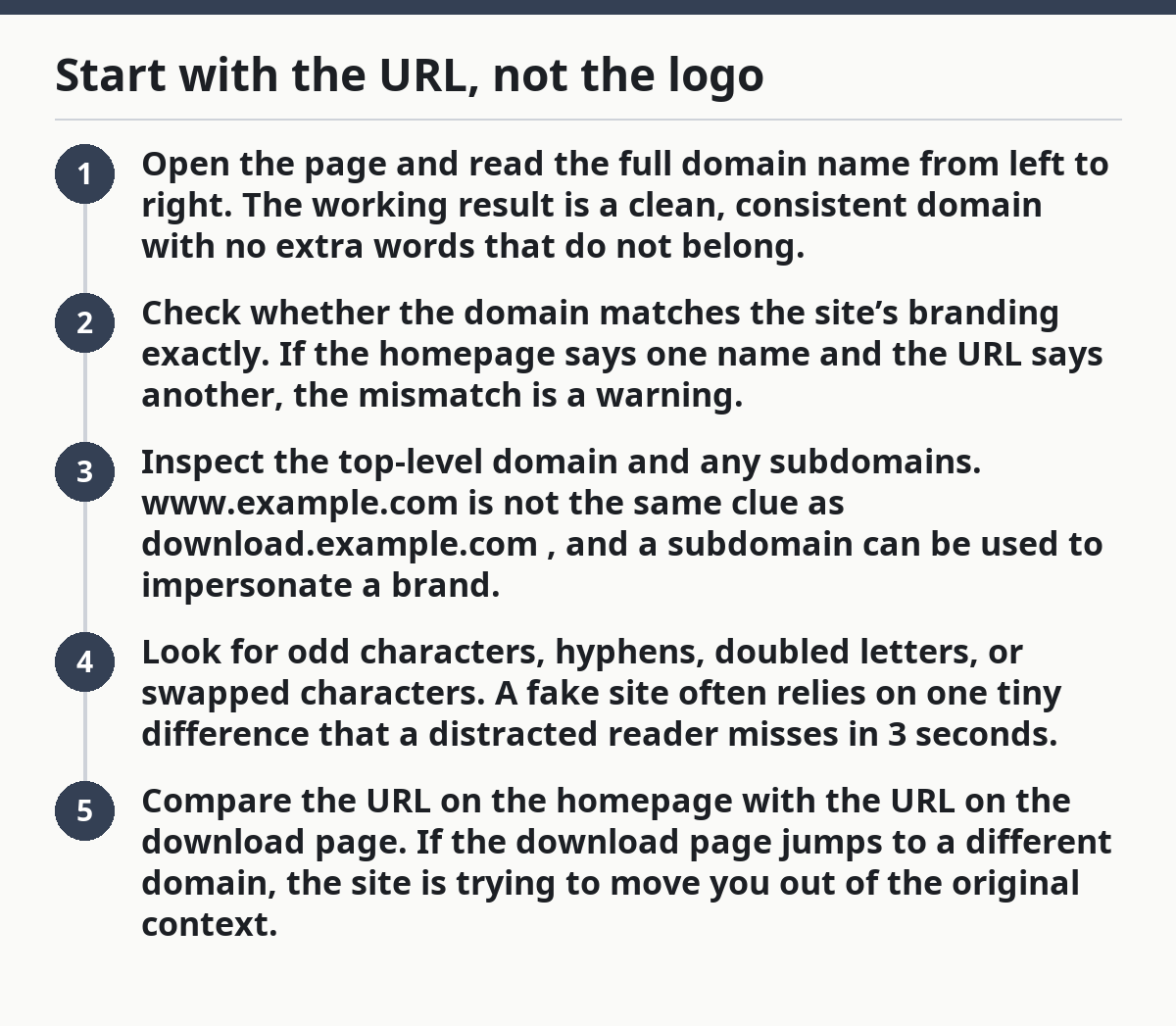
Start with the URL, not the logo
The URL is the quickest place to spot a fake APK mirror site. A real mirror site may use a plain domain, but a copycat often adds extra words, swaps letters, or tacks on a different extension such as .net instead of .com.
Look at the entire address bar, not just the first few characters. A site can hide a misleading string in the middle, like apk, mirror, or the app’s name, while still sending you somewhere else. On mobile, long addresses get truncated, so tap the bar and expand it before you trust the page.
Here is the order that matters:
- Open the page and read the full domain name from left to right. The working result is a clean, consistent domain with no extra words that do not belong.
- Check whether the domain matches the site’s branding exactly. If the homepage says one name and the URL says another, the mismatch is a warning.
- Inspect the top-level domain and any subdomains.
www.example.comis not the same clue asdownload.example.com, and a subdomain can be used to impersonate a brand. - Look for odd characters, hyphens, doubled letters, or swapped characters. A fake site often relies on one tiny difference that a distracted reader misses in 3 seconds.
- Compare the URL on the homepage with the URL on the download page. If the download page jumps to a different domain, the site is trying to move you out of the original context.
A reliable mirror site keeps the same identity across its URLs. A copycat tends to wobble between names, domains, and redirects. That wobble is the point of the check.
Does the site branding line up with the mirror site name?
Yes, a real mirror site keeps its branding, naming, and layout consistent enough that the same page feels like the same property. A fake often gets one of those details wrong.
Read the name in the header, footer, and browser tab. If the tab title says one brand, the logo says another, and the page text uses a third variation, the site is borrowing trust from somewhere else. That kind of mismatch is common on copycat domains because the operator copies pieces from several places and never fully harmonizes them.
The same check applies to visual design. A genuine mirror site usually has a stable system: the same font pair, the same button style, the same category labels, and the same spacing from page to page. A fake often looks assembled in a hurry. You may see one screenshot style on the homepage, another on the app listing, and a third on the download page. That inconsistency is not proof by itself, but it is a strong signal when combined with a suspicious URL.
Watch for these branding breaks:
- A site name in the header that is missing from the domain.
- A favicon that does not match the logo.
- Footer text that names a different company or project.
- A homepage that looks polished but a download page that uses generic widgets and stock phrasing.
- A copyright line that seems dated or copied from somewhere else.
If the branding cannot stay consistent for 2 pages, it is unlikely to be a trustworthy mirror site. Real sites can redesign. Copycats usually confuse themselves in the process.
How do I inspect the download page layout for copycat clues?
You inspect the download page by checking whether it behaves like a focused file page or like a traffic trap. A real mirror site download page is usually plain, direct, and repetitive in a predictable way; a fake one tries to distract you with buttons, banners, and urgency.
Start with the page structure. The download control should be obvious without hunting. If you have to scroll past three ad blocks, two pop-ups, and a fake countdown, the site is not acting like a normal mirror site. A legitimate mirror may still have ads, but the main action should remain clear.
Then compare the page’s internal logic:
- Read the heading and the file details. A real download page usually repeats the app name, version, file size, and package name in a consistent format. The result should be a clean relationship between title and file details.
- Look for one primary download action. If the page has 4 or 5 similar-looking buttons, especially ones that say “Download Now,” the site is trying to create confusion.
- Check whether the file information changes as you scroll. If the same APK is described differently in two places, the page was likely assembled from fragments.
- Look at the path after the domain. A tidy page often uses a readable structure. A copycat may dump every page into an awkward path that looks machine-made or copied from a template.
- Notice whether the page tries to force an app install, browser permission, or extension before showing the file. A normal mirror page should not need that kind of detour.
The most telling sign is tone. A good download page feels like a filing cabinet. A fake one feels like a sales page pretending to be a filing cabinet. If the layout pushes you to act in under 10 seconds, that is a design choice worth distrusting.
What site reputation signals are worth checking first?
The strongest reputation signals are the ones that can be confirmed in under 2 minutes and do not depend on a polished homepage. A fake APK mirror site may copy a name, but it has a harder time faking a history of stable mentions across independent places.
Start with the domain age clue you can observe indirectly. You do not need a formal lookup service to notice if a site behaves like a brand-new shell: sparse pages, only one or two app listings, and the same template repeated with minor changes. A mirror site with real presence usually has more than a single thin page.
Then check whether the site is referenced consistently elsewhere. Search the exact domain, not just the brand name. If results are filled with warning threads, unrelated pages, or copies of the same site under different domains, that is a bad sign. If the only references are the site itself and a few recycled pages, the reputation is shallow.
Other useful signals include:
- A contact page that gives only a form and no meaningful identity.
- Terms or policy pages that read like boilerplate with generic placeholders.
- A site-wide pattern of recycled wording across many app pages.
- Multiple domains that point to nearly identical layouts and suggest a clone network.
- A download page that changes behavior depending on referral source or device.
One thing to avoid is overreading a clean design. A copycat site can look modern and still be fake. Good reputation is about consistency, not polish. If the site feels newly built, thinly populated, and interchangeable with 3 other domains, that is enough reason to slow down.
For a broader walkthrough of APK download verification, the hub on APK download safety and verification covers the next layer of checks without repeating these mirror-specific clues.
Which fake mirror site patterns fool people most often?
The most common trick is the near-match domain. A fake mirror site uses one extra word, one swapped letter, or a different extension so the address feels familiar at a glance. A person sees “apk,” sees the brand shape, and stops reading before the mismatch lands.
Another frequent pattern is the copied front page with a different download path. The homepage may look convincing, but the app listing opens on a page that uses different branding, different headings, or a different domain entirely. That split is a classic sign of a copycat operation because the homepage is built to attract trust while the download page is built to harvest clicks.
A third pattern is fake reputation padding. The site may display badges, “verified” labels, or reassurance text that looks official but has no traceable source. On a legitimate mirror site, labels are usually restrained. On a fake, the language often sounds loud and repetitive. If the page claims trust in 2 or 3 different ways, that is often because it lacks real trust signals.
For example, a mirror site that says “verified” in the header, footer, and a pop-up is still only one site. The repetition is a tactic, not evidence.
Common mistakes that cost people the most:
- Trusting the logo alone. Cost: you miss the domain mismatch. Use the URL first.
- Skimming only the homepage. Cost: the download page does the real impersonation. Check both.
- Assuming https means legitimacy. Cost: encryption does not prove identity. Many fake sites use https.
- Ignoring tiny spelling changes. Cost: one letter can separate the real site from the clone. Read the full name.
A good rule is simple: if the site depends on you being rushed, it is doing the opposite of what a trustworthy mirror site should do.
Why careful reading matters on a mirror site
When a mirror site asks for quick trust, slower reading is useful because it gives the URL, branding, and download page time to agree or disagree. A rushed click can miss the one character that changes the domain.
At the same time, the safest habit is to pair reading with the 3 checks above instead of relying on instinct alone. The goal is not to become suspicious of everything. The goal is to notice whether the page structure, the domain, and the brand all point to the same source.
One way to make that easier is to compare the page in 2 places before downloading. Look at the homepage once, then open the app page or download page and compare the names, button labels, and file details. If they line up, the site is less likely to be a copycat.
When a mirror site is probably not the real one
A mirror site is probably not real when its domain, branding, and download page stop agreeing with each other. That mismatch is the most reliable pattern to watch.
The strongest red flags appear in clusters. A site with a similar name, a shaky layout, and a download page that suddenly pushes you through extra steps is almost never just “messy.” It is usually a copycat site that hopes the reader will stop checking once the page looks close enough.
Be wary when you see these combinations:
- A URL that is close to the known brand but not exact.
- Branding that changes between the header, tab title, and footer.
- A download page that hides the file behind several buttons or redirects.
- Reputation signals that are thin, recycled, or absent.
- A site that looks old in one place and brand new in another.
What this page is not for: it is not the place to decide whether the APK itself is safe to install, whether the app permissions make sense, or whether a modded build should be trusted. Those are separate questions. This page only helps you identify an impostor mirror site before you go any further.
If a site fails 2 of the 3 core checks — URL, branding, and page behavior — I would treat it as suspect and, if you are unsure, consult a security professional or another trusted source before downloading. If it fails all 3, there is no reason to keep going.
How can I tell if an APK site is a copycat?
A copycat site usually disagrees with itself in small ways. The domain may be close to the real name, but the header text, footer, and download page do not line up cleanly.
Check whether the same brand appears in the URL, the site branding, and the page title. If those three do not match, the site is borrowing trust rather than earning it.
What are signs of a fake mirror site?
The main signs are a near-match domain, inconsistent branding, and a download page that feels engineered to rush you. A fake mirror site often uses extra buttons, redirects, or a layout that changes from page to page.
A real mirror site tends to stay visually and structurally consistent. A fake one usually slips in 2 or 3 different design languages at once.
Should I trust APK mirrors with similar names?
No, not until the full URL and page behavior match the real site exactly. Similar names are a common copycat tactic, especially when the domain adds one word, changes one letter, or uses a different extension.
A similar name is a clue, not a credential. If the site also shows weak branding and a messy download page, the similarity is part of the trick.
For more on general web-domain checks, see the FTC’s guidance on spotting phishing and deceptive websites and Google’s Safe Browsing guidance on unsafe sites.
Drafted with AI; not yet reviewed by a person.