Last updated: November 18, 2026
Key Takeaways
- The most reliable APK source is the one you can verify, not just the one you can download from.
- A good APK source tells you the signer, version, and whether the file matches the developer’s release.
- Find APK files by matching the exact package name to the developer’s listing before downloading.
- Official stores are usually safest for updates; third-party sites are mainly for cases the store cannot cover.
- Quick Answer: For most users, the Google Play Store is the default choice, and a verified developer site is the next best option.
APK sources and file discovery — The Complete Guide covers where Android app installation files come from and how to identify them before you install anything. The safe answer is simple: start with the Google Play Store when you can, use the app maker’s own site or a reputable distributor when you cannot, and treat any APK you find through search as untrusted until you check its package name, signature, version, and file type. When the app is high-risk or the source is unclear, consult a professional and follow Google Play Help and Android’s app-signing guidance.
I write about Android app distribution, app signatures, and mobile security, so I care less about where a file lives than whether it is the file you think it is.
The short answer: where APK files should come from
The short answer is that APK files should come from a source you can verify, not just one you can find. For most people, that means Google Play first, then the developer’s official website or a well-known distributor that preserves signing data and version history.
An APK is the installable package for an Android app. A single app can also come as an AAB, split APKs, or an XAPK/ZIP wrapper, so “found an APK” does not always mean “ready to install.” The file may be legitimate, but still incomplete for your device if it depends on architecture-specific splits or expansion data.
The dangerous part is file discovery. Search results, file lockers, and repost sites often surface older builds, renamed files, or repackaged APKs. That is where users get burned: the filename looks right, the icon looks right, but the signature is wrong or the app has been modified. Google Play Protect and Android’s package installer can catch some issues, but neither replaces basic verification.
When a reader asks for “APK sources,” the real question is usually, “How do I get the app I want without installing the wrong file?” The answer is to prefer sources that preserve the original signer, show version metadata, and let you cross-check the package name against the app maker’s listing.
What counts as a trustworthy APK source?
A trustworthy APK source is one that can tell you who signed the app, which version you are getting, and whether the file matches the developer’s release. That usually points to three tiers: the developer’s own site, the app store, or a distributor that keeps original signatures and change history intact.
The official store is often the safest default because it ties the app to a developer account and offers some malware screening. The developer’s site is next best when the maker publishes direct downloads, especially for open-source apps, enterprise tools, or apps unavailable in a region. A reputable mirror or archive can be acceptable only if it preserves the original signing certificate and does not repackage the app.
The source matters for reasons a generic “download APK here” page usually leaves out. One of the most important is signer continuity. Android uses signing certificates to confirm that an update came from the same publisher as the original app. If the signature changes unexpectedly, that is a red flag. Another is build integrity. A site may host a file with the right name and version number, but if it has been repacked, adware or spyware can slip in.
A practical rule helps here: if the source cannot tell you the app’s package name, version code, and signer, it is not a serious source. That is especially true for finance apps, password tools, messaging apps, and anything that asks for accessibility access, notification access, or device administrator privileges.
This is also where people overtrust “clean APK” claims. No source is clean by label alone. Provenance, signature, and metadata are the main signals.
How do I find the right APK file without downloading the wrong one?
You find the right APK file by searching for the app’s exact package name, then matching the source page to the developer’s listing before you download anything. The package name is the stable identifier, usually something like com.example.app, and it is more reliable than the app’s display name.
Start with the app’s official listing or website and identify three details: package name, current version, and supported Android range if the developer lists it. Then compare those details to any file source you find. If the file page shows only a friendly app title, a big green download button, and no signer information, skip it.
This is where file discovery gets technical fast. On Android, a single app can have:
- a universal APK, which installs on many devices;
- split APKs, which divide resources by CPU architecture, screen density, or language;
- an app bundle on the developer side, which is not directly installable as a plain APK;
- an XAPK or APKM wrapper, which may contain more than one package file.
If you only need a manual install, a universal APK is the least confusing option. If the app is split into multiple files, you need a proper installer that understands split packages, or the install may fail. A plain file manager is not enough.
When you are searching, avoid result pages that confuse the issue with cloned filenames. File discovery should answer four questions before the download begins: What is this package called? Who signed it? What version is it? Is it a single APK or a split bundle? If one of those answers is missing, the file is still a mystery.
The honest difference between official stores and third-party APK sites
Official stores usually win for safety and update flow; third-party APK sites win only when you need access the store cannot give you. That is the real split. Everything else is detail.
| Criteria | Official store | Third-party APK site | Winner for this condition |
|---|---|---|---|
| Signature trust | Tied to the developer account and signer checks | Depends on whether the site preserves the original signature | Official store |
| Update delivery | Automatic updates, often on Android 8.0+ | Usually manual re-downloads | Official store |
| Region locks | Can block you by country or device | May offer direct access to the same build | Third-party site |
| Version history | Usually limited to the current release | May keep older builds for rollback | Third-party site |
| Risk of repackaging | Low | Higher unless the site is well documented | Official store |
| Split APK handling | Automatic | Often requires a special installer | Official store |
| Access to open-source or niche apps | Sometimes unavailable | Often easier to obtain directly | Third-party site |
| Metadata clarity | Usually strong | Varies widely by site | Official store |
| Rollback to a known stable build | Rarely practical | Often possible if the archive keeps old versions | Third-party site |
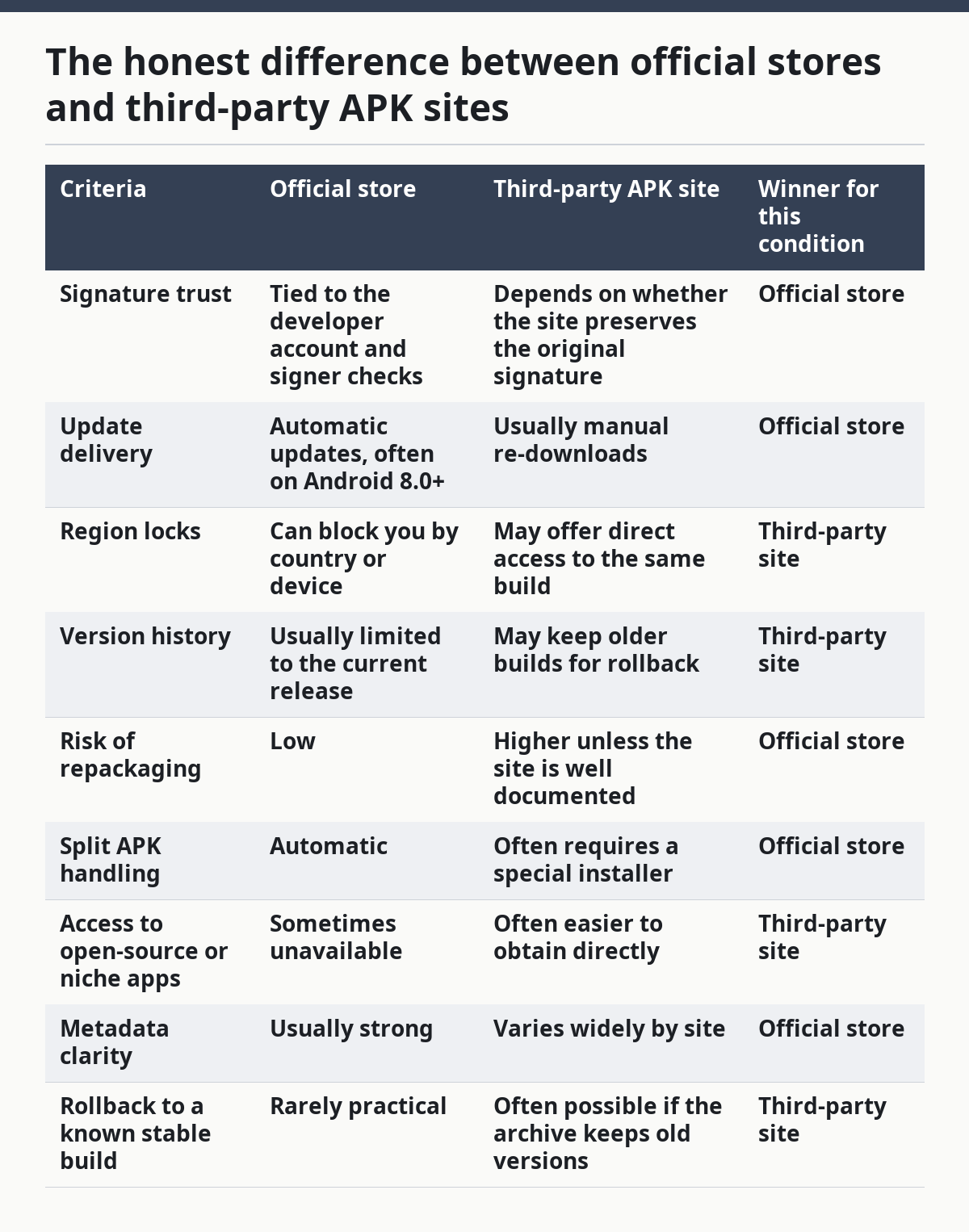
The official store is the right choice for almost anyone who wants an app to install and keep current with minimal thought. The third-party route wins for people who need a specific build, an app removed from a region, or an older version that still works with a device on Android 7, 8, or 9.
The weakness of third-party sites is not subtle. They can host tampered builds, omit signature details, and bury the real file under misleading download options. That creates a real consequence: a user may install the wrong app and only notice when permissions look odd, updates stop, or the app behaves differently than the version listed in reviews.
The weakness of official stores is narrower but real. They can hide older versions, enforce region restrictions, and reject apps that are not store-ready. If you need a direct build from the developer, the store may simply not be enough.
How can you verify an APK before installing it?
You verify an APK by checking the package name, the signer, the file type, and the source page before Android ever gets to the install screen. That is the fastest way to reduce risk without pretending every file can be trusted.
First, confirm the package name. If the listing says com.vendor.app but the file metadata says something else, stop. Second, check the signer or certificate fingerprint if the source provides it. A changed signer is not a minor detail; it can mean the app was rebuilt or replaced. Third, look at the file extension and wrapper. A file named .apk that arrives inside a ZIP, RAR, or password-protected archive deserves extra suspicion. Fourth, inspect the permissions the app requests after installation. An audio player has no reason to want SMS access.
A useful pair of tools exists on the Android side: package viewers and hash checkers. SHA-256 is the common integrity hash you will see in security workflows, and while a matching hash does not prove an app is safe, it does prove the file did not change after the publisher generated the hash. If the site lists a SHA-256 hash, compare it exactly.
Source reputation matters too, but “popular” is not the same as “trustworthy.” A site can have years of traffic and still host stale copies. The more useful question is whether the site shows version codes, build dates, signer data, and direct links to the original developer when available.
One more detail often missed: Android app signing changed materially when Google Play App Signing became widely used, so you may see the publisher’s upload key in some contexts and a different distribution key in others. That does not automatically mean a problem, but it does mean the source should explain what you are looking at. Silence is the problem.
What file discovery gets wrong most often
File discovery goes wrong when people search by app name instead of package name and then trust the first download result. That creates three common failures: the wrong app, the wrong version, or the wrong package format.
The first failure is the simplest. Many apps share similar names, especially on sketchy mirrors. A search for “music player APK” can return dozens of unrelated builds. The second failure is more subtle. The file might be a real version, but not the version you need. For example, an older build may still run on Android 6 but fail on a current device because of an outdated target SDK or missing split resources. The third failure is format mismatch: the user downloads a split package when the device expects a simple install flow.
Another thing generic advice gets wrong is assuming file size proves anything. A large APK is not safer, and a small APK is not suspicious by itself. Size only tells you the package includes more assets or less bundled data. It does not tell you whether the app is legitimate.
File discovery also gets messy when search engines index cached or mirrored pages that have no relationship to the current release. A download page can stay live after the developer has moved on. The page may still rank, still have comments, and still be wrong. That is why the source page should be treated as evidence, not as authority.
If the goal is a working install, the real workflow is: identify the app, verify the developer, match the package name, confirm the signer, and only then download. Skipping a step saves time once and causes trouble later.
When should you avoid APK sources entirely?
You should avoid APK sources entirely when the app is available in the official store, the store version meets your needs, and the app handles money, identity, or private messages. In those cases, the added risk and friction of side-loading usually buys nothing.
This is the clearest call in the guide. Banking apps, payment apps, authenticator apps, crypto wallets, and messaging apps are poor candidates for third-party APK hunting unless the developer explicitly directs you there. The reason is not just malware. It is also the damage caused by a stale, incompatible, or tampered package that breaks login flows or locks you out of data.
You should also skip APK sources if you are not prepared to verify them. That means no blind installs from social posts, random forums, or search result snippets. It also means no “unknown sources” habit that stays on permanently for convenience. On modern Android versions, install permission is granular enough that you can enable it for one file manager or browser and then turn it off again.
A common argument says side-loading is normal, so it must be safe if done often enough. That is wrong. Common is not safe. Enterprise Android, developer testing, and open-source distribution all use APKs, but they also use signature checks, trusted channels, and controlled release processes. The safety comes from the process, not the file extension.
Which source should you choose for your situation?
Choose the official store if the app is listed there, you want automatic updates, and you do not need an older build. Choose the developer’s official site if the app is absent from the store, the maker publishes direct downloads, or you need the exact release notes and signature details. Choose a reputable third-party archive only if you need a specific version, a region-free download, or a split package and the archive shows package name, signer, and hash.
That is the clean recommendation.
The best source depends on one thing: whether you need convenience or control. If you want convenience, the official store wins. If you want control over versioning, package format, or regional availability, a reputable archive can help, but only if it exposes enough metadata to verify the file. If it does not, it is not a real option.
The source should also match the app category. For low-risk utilities, readers may accept a little friction to get the version they want. For apps that handle payments, authentication, or private data, the bar should be much higher. In those cases, the safest answer is to use the developer’s official channel or the store and not improvise.
Exception scenarios that change the answer
The verdict flips in a few narrow cases. First, if the app is removed from the store in your country but the developer still publishes on its own site, the official website becomes the better source. Second, if you need an older build because a device on Android 7 or 8 breaks on the current release, a reputable archive with historical versions can be the practical choice. Third, if the app is open source and the project publishes signed releases on GitHub, F-Droid, or the project site, that direct channel can be more transparent than a storefront. Fourth, if you cannot verify signer data at all, no source is good enough and the only sane move is to skip the install.
These exceptions show the pattern behind the rule. The best source is not “the one with the biggest download button.” It is the one that gives you enough information to know the file is genuine and compatible. If the source cannot do that, it has failed the main test.
What to do before you tap Install
Check the package name, the signer, and the file format, then install only from a source that matches the developer’s own release details. If those three things line up, your odds are much better.
Use Google Play Help and Android’s own security guidance as your baseline, not a random download site. Google’s support pages on app verification and Play Protect are useful starting points, and the Android documentation on app signing explains why signature continuity matters. Those are the kinds of sources that describe how the system is supposed to work, which is more valuable than a page that merely offers a file.
If the file came from a search result, treat the search result as a lead, not a verdict. If the source cannot answer who made the file, what version it is, and how you can confirm it has not been altered, keep looking.
FAQ
What is the safest place to download an APK?
The safest place is usually the Google Play Store, because it ties the app to the developer account and handles updates for you. If the app is not in the store, the next safest source is the developer’s own website or another official release channel that publishes signing details.
How do I know if an APK file is real?
A real APK usually matches the app’s package name, version, and signer information from the developer’s listing or release page. If the source cannot show those details, or the file arrives in a strange wrapper with no hash or signer data, treat it as unverified.
Can I install an APK if it is a split package?
Yes, but not with a simple tap on a single file in many cases. Split APKs often need an installer that understands multiple package parts, because one file alone may not contain everything the app needs to run on your device.
Is downloading old APK versions a bad idea?
Not always. Older versions can help when a new release breaks compatibility with an older Android device or removes a feature you still need. The trade-off is that old builds may miss security fixes, so this choice makes sense only when you understand the risk.
Do I need antivirus to check an APK?
Antivirus can help, but it should not be your only check. The stronger habit is to verify the package name, signer, and source first, because a scanner that comes up clean does not prove the file is the correct build from the correct publisher.
Drafted with AI; not yet reviewed by a person.