Last updated: November 19, 2026
Key Takeaways
- A good APK directory can help, but choice depends on the job, not the flashiest button.
- Search tools that surface developer, package, and version details make comparison much easier.
- Some pages show history clearly; others only push a download; some add ad clutter.
- Pick the source that fits your task, not the one with the biggest download button.
APK download directories and app discovery — The Complete Guide helps you find Android apps outside the Play Store, and the right one depends on whether you want discovery, older versions, or a mirror you can trust. Quick Answer: use a directory with clear version history, checksum data, and a visible source trail; skip any site that hides the uploader or bundles a custom installer. This guide shows where to start, what each type of directory is good for, and which red flags should send you away.
The short version: what an APK directory is for
Picture this: you need an Android app that is missing from your region, pulled from Google Play, or updated too slowly for your device. An APK directory can help when those cases come up, and the best one is not the one with the flashiest download button.
An APK directory is a catalog of Android app packages, usually with version pages, changelogs, and file details. Some are mirrors, some are indexes, and some are basically ad farms. The useful ones make it easy to check the package name, version code, and signing certificate before you touch a file. In 2024, Google still reported that over 2.5 billion users protected by Play Protect were scanned across Android devices, which is one reason many readers still compare sources before installing.
A useful directory should answer three questions fast: where did the APK come from, which version is it, and how do I know it matches the app I want? If it can’t do that, it’s just noise.
- Look for version history
- Look for file hashes or certificate info
- Look for the original package name
- Avoid sites that force an installer app
- Avoid sites that rename apps for clicks
How app discovery works on APK sites
Picture this: you know the kind of app you want, but not the exact name. A good directory helps you search by developer, package name, category, or version history, so you can compare copies instead of gambling on the first result.
A discovery page works best when it gives you a path, not just a title. It should show the app’s release lineage — the new builds, the old builds, and the change notes that explain why one version might fit your phone better than another. That matters when an update breaks a feature or a newer build drops support for an older Android version.
Here’s the catch: many APK sites are better at advertising than discovery. They surface trending apps, but hide the useful filters. A real directory should let you move from app name to version page to file details without dead ends.
What good discovery usually includes:
- Search by app name, package, or developer
- Version lists, not just the latest file
- Android version requirements
- Architecture notes like arm64-v8a or universal
- Clear labels for bundled splits versus single APKs
If a site has none of that, it may still be a source, but it’s a poor discovery tool. You’ll spend more time cleaning up bad results than finding the right app.
The real difference between directories, mirrors, and stores
Picture this: you are comparing three sites that all claim to have the same APK. One gives you a clean history page, one only offers a download button, and one wraps every tap in ads. Those are not the same product, even if the file name looks identical.
APK directories are catalogs. APK mirrors host copies of files. App stores package discovery, install flows, updates, and ratings into one place. The trade-off is simple: directories give you more control, while stores give you more convenience.
| Criteria | Directory | Mirror | Winner for condition |
|---|---|---|---|
| Discovery quality | Usually strong search and version pages | Often file-first, search-second | Directory for comparing versions |
| File provenance | May show source notes and package details | Can be opaque unless it documents the mirror chain | Directory for research |
| Update speed | Depends on indexing cadence | Can be fast if it tracks one source closely | Mirror for quick rehosting |
| Version history | Often the main strength | Sometimes limited to current file | Directory for rollback needs |
| Trust signals | May list hashes, certificates, or uploader details | Sometimes only file mirrors and a checksum | Directory if it shows metadata |
| Search for older builds | Common and useful | Hit or miss | Directory |
| Risk of clutter | Lower if the site is curated | Can be high if pages are thin | Curated directory |
| Best use case | Finding the right APK and the right version | Grabbing a known file from a known source | Depends on the job |
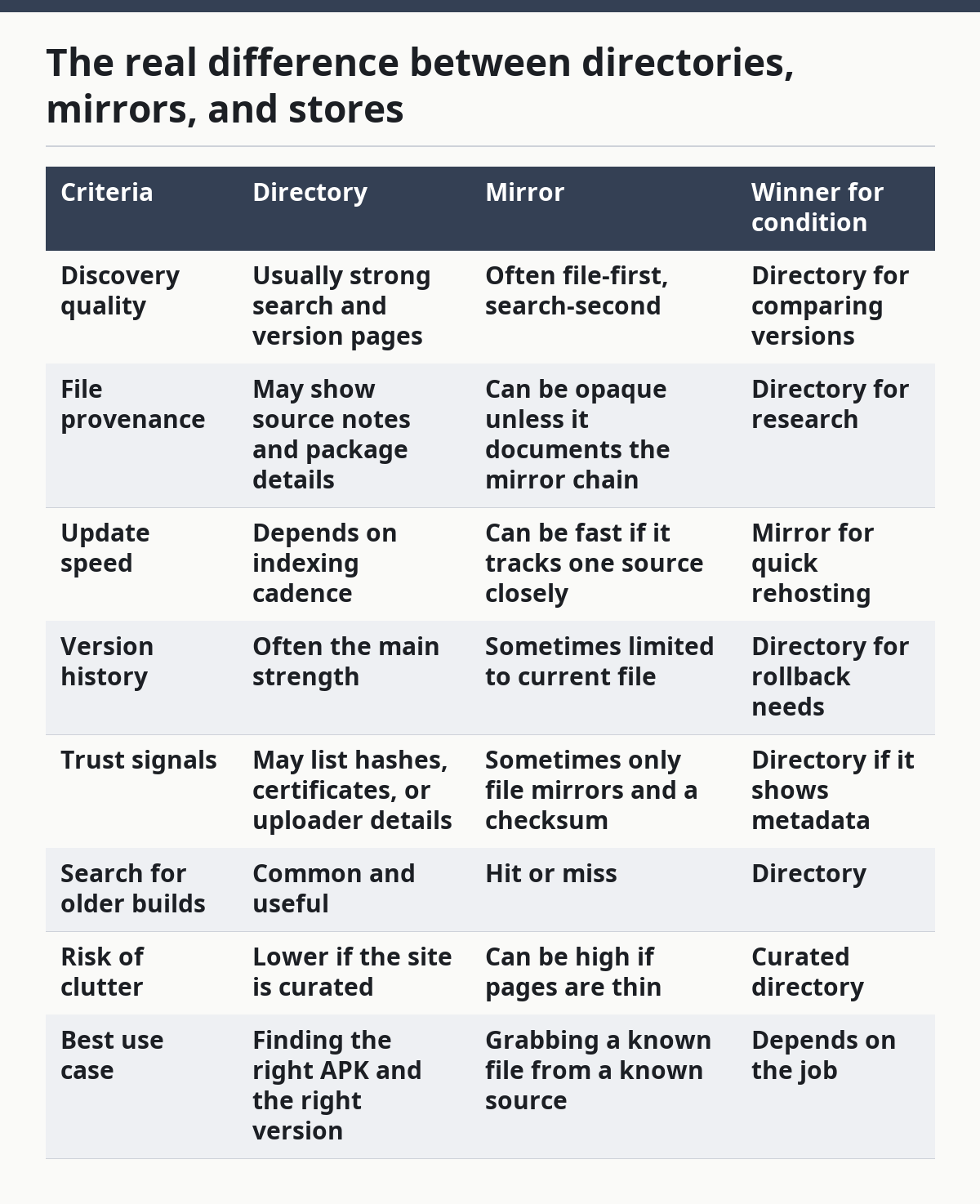
The honest answer is that a directory wins for most discovery work, while a mirror wins when you already know exactly what you need. A store still wins if you want the least hassle and the safest update path, especially when automatic updates matter.
What makes a directory worth using?
Picture this: you land on a site and the app looks right, but the page gives you no version code, no file size context, and no clue whether the APK is split or bundled. That is the difference between a directory you can use and one that just looks busy.
A good APK directory earns trust with metadata, not hype. It should show the package name, release versions, Android compatibility, and enough file detail to help you compare builds. If it also shows uploader identity, signing history, or a checksum, that’s better. According to Android Developers, Android App Bundles became the recommended publishing format in 2018, which helps explain why many listings now need split-file context.
The best directories also behave like reference tools because they let you compare versions without forcing a download, and they keep old releases visible instead of burying them behind a search trap. That is valuable when an update breaks a widget, changes permissions, or drops support for Android 8 or Android 9.
Signs a directory is worth your time:
- Version pages with changelogs
- Clear package names
- Visible Android minimum version
- Split APK warnings
- Download pages without fake countdowns
- A stable page URL for each build
The downside is obvious: a directory is only as trustworthy as the metadata it exposes. If the site gives you no file origin, no signature details, and no way to confirm the upload, treat it as a lead — not proof. If needed, consult a qualified security professional or a source like Android Developers before you rely on it.
Which discovery signals matter most before you download?
Picture this: two APK pages both claim to be the latest build, but one lists the signer, the architecture, and the minimum Android version while the other only says “download now.” The first page is useful. The second is a trap.
The single most useful discovery signal is identity. You want to know that the APK belongs to the app you expect, not a lookalike with a familiar icon. Package name is the cleanest anchor because the title can change while the package often stays stable.
After that, version history matters. If a site shows build-by-build changes, you can spot whether the file you want is the last stable release or a newer one that changed permissions, libraries, or device support. For older phones, that can save a lot of churn.
Useful signals to check in order:
- Package name
- Version code or version name
- Android minimum version
- Split or single APK format
- Signature or certificate match
- File size that makes sense for the app
- Changelog or release note
One more thing: if the directory lets you sort by uploader or source, use that. A clean uploader trail is not a guarantee, but it is better than blind trust. If none of these signals are present, the page is not really a discovery tool — it is just a download page with a search bar.
What can go wrong with APK download directories?
Picture this: you click the first result, the page looks legit, and the download gives you a file that is bundled, ad-heavy, or simply not the app you meant to find. That is how bad discovery pages waste time and raise risk.
The biggest problem is not just malware. It is confusion. Some sites copy app names, reuse screenshots, and build pages around SEO rather than accuracy. That makes it easy to land on a clone listing that looks right at a glance and wrong under scrutiny.
A second problem is broken version control. A directory may list “old versions,” but not clearly label which build is stable, which one is modded, or which one needs a split installer. If the page doesn’t explain that, the burden shifts to you.
Common failure modes:
- Fake or duplicated app pages
- Missing certificate data
- Split APKs presented like normal APKs
- Aggressive ads that hide the real button
- Version pages with no real changelog
- Files with no clear source trail
The honest trade-off is this: the more open a directory is, the more effort it may take to verify each file. That is the price of getting outside a closed store. If you want low friction over control, a store is the better fit.
How to use APK directories safely
Picture this: you are ready to download, but you still want a sane process that cuts down the risk of a bad file. That process should be boring. Boring is good.
Start with the app identity, then compare the package name across at least two sources if possible. Check whether the page lists the Android minimum version and whether the file is a split package. If the site offers hashes or signature details, use them. If it does not, that is a warning, not a green light.
Safe-use habits that matter:
- Prefer a directory with version history
- Verify the package name before download
- Avoid files that require a separate installer unless you know why
- Check whether the app is listed as split or universal
- Read the release notes before you install
- Keep a record of the build you chose
The best part? This process does not require fancy tools. It just requires discipline. If a page feels slippery — hidden buttons, vague labels, no metadata — back out. The next directory is usually one search away.
Why split APKs need extra care
Picture this: you found the app, but the file is marked as a split APK or app bundle. That means the download may not install like a single APK, and the page should say so plainly.
Split packages are common because they let developers ship smaller, device-specific files. The downside is obvious: they are easier to mis-handle if the site does not explain the format. If a directory treats a split like a normal APK, it is not doing its job well.
When should you use a directory instead of the Play Store?
Picture this: you want an older build, an app that is region-locked, or a version that no longer shows up in Google Play. That is when a directory makes sense. If you just want the current release and automatic updates, the Play Store is still the easier path.
Use an APK directory when you need one of these:
- A specific older version
- A package that is missing from your region
- A build for an older Android device
- A file source you can inspect before installing
Use the Play Store when:
- You want automatic updates
- You do not want to manage APK files
- You care more about convenience than version control
The trade-off is simple. APK directories give you choice and history. The Play Store gives you fewer decisions and less risk from bad pages. If you’re managing multiple devices, APK directories can be very helpful. If you just want an app to arrive and update itself, they can feel like work.
The verdict: which kind of APK source to choose
Picture this: you have one app to find and three kinds of sources in front of you. The right choice is the one that matches your job, not the one with the biggest download button.
Choose a curated APK directory if you care about app discovery, version history, and comparison. Choose a known mirror if you already know the exact file you need and only want a copy from a source you trust. Neither is right if the page hides the uploader, skips metadata, or pushes a custom installer with no explanation.
The cleanest rule is this: discovery first, download second. If the directory helps you identify the right package, version, and format, it has done its job. If it only hands you a file, it is not really helping you discover anything.
Exception scenarios that change the choice
Picture this: the normal advice points one way, but your situation has a wrinkle. That’s where the answer flips.
A directory is not the right answer if you only need one official app and the Play Store already offers it. In that case, store delivery is safer and easier.
A mirror can be better than a directory if the directory is stale but the mirror tracks a reliable source closely. That is especially true when the app changes often and you already know the correct package.
If you need a corporate, school, or device-policy install, the best source may not be a public directory at all. Managed app distribution is a different lane, with different controls.
If the app is split into multiple files and the directory does not explain installation clearly, walk away. A clearer source is worth more than a faster download.
Questions people usually ask before choosing
Is an APK directory the same as an app store?
No. An APK directory is mainly a catalog and file index, while an app store handles discovery, installation, and updates in one place. If you want old versions or a specific package build, a directory helps more. If you want less friction, a store is easier.
What is the safest thing to check first?
Check the package name first. It is the clearest way to tell whether the APK really matches the app you wanted, especially when app titles and icons are copied or renamed. After that, check the version and Android minimum version.
Are split APKs bad?
No, but they need more care. Split APKs are common and often legitimate, yet they are easier to mishandle if the directory does not explain the format. If a page doesn’t say how the file should be installed, that is a bad sign.
Should I trust the first download result?
No. The first result is often the most visible, not the most accurate. Compare the package name, version details, and file notes before you download. If those details are missing, use a different source.
What should make me leave a site immediately?
Leave if the site hides the uploader, uses fake download buttons, gives no version history, or refuses to show basic file details. Those pages create more risk than value. A real directory should make the file easier to judge, not harder.
Drafted with AI; not yet reviewed by a person.