
Last updated: November 18, 2026
Quick Answer: APK download safety and verification depend on four checks, and the fastest safe triage is to verify the source, signature, hash, and package name before you install anything.
Key Takeaways
- A malicious APK can look normal by filename and still carry ad fraud, credential theft, or spyware.
- An APK is risky because Android treats installation as a trust decision, not a guarantee of safety.
- You verify an APK by checking the source, the hash, the signature, and the package identity before installation.
- If you only have a minute, the signature check is the best quick indicator of developer identity.
APK downloads are safe only when the file comes from a trustworthy source and is verified before installation; if you cannot confirm the source, the signing certificate, and the file’s integrity, you should not install it. APK download safety and verification is the complete guide to that process, and the practical rule is to verify the source, the package identity, and the hash before you open the installer. The fastest way to reduce risk is to get the APK from the developer or a reputable distribution channel, then confirm the package name, signature, and file integrity before you install it.
I write about Android app distribution, app signing, and mobile security because those are the parts that decide whether an APK is legitimate or a disguised compromise.
The decision that matters before you tap “Download”

The right choice is not “APK or no APK,” but “can I prove this APK is the one the developer intended?” That is the question that matters because Android will install anything that fits the package rules, including software you would never want on your phone. A malicious APK can look ordinary at the filename level and still carry ad fraud, credential theft, or spyware behavior.
The first filter is the source. The safest source is usually the developer’s own site or the official app store entry, but users should still verify the download page, the package name, and the publisher details. The next safest is a reputable mirror that preserves the developer’s signing certificate and publishes hashes. The riskiest source is a random forum post, a file-sharing link, or a “mod” site promising premium features. Those sources often repack apps, and repacking changes the certificate. That is a clear warning sign, because it means the file is no longer the original app.
Verification has three layers. First, confirm the package identity: the app name, package name, and developer name should match what the legitimate app uses. Second, confirm the signature: the certificate should match the official release or at least remain consistent across releases from the same publisher. Third, confirm the file integrity: if the developer publishes SHA-256 or SHA-1 hashes, compare them before installation. The Android Developers app signing documentation explains why the certificate matters: https://developer.android.com/studio/publish/app-signing
The advice changes if the APK is for a niche app, an old version, or a device that cannot use the Play Store. In those cases, APKs may be the practical route, but the bar for trust goes up, not down. If the source cannot answer basic questions about who signed the file and when it was built, skip it.
What makes an APK risky?
An APK is risky because Android treats installation as a trust decision, not a guarantee of safety. The file format itself is normal; the danger comes from what is inside it and who signed it. A genuine APK can still be poorly coded, but an altered one can be actively hostile.
The biggest risks are repackaging, permission abuse, and supply-chain tampering. Repackaging is when someone takes the original app, adds unwanted code, and signs the new version with a different certificate. Permission abuse is when the app asks for access that has no reasonable connection to its job, such as a flashlight app requesting SMS or accessibility control. Supply-chain tampering is when the file is altered between the developer and the user, often on an untrusted mirror or a compromised download page.
The most useful warning sign is not flashy malware behavior; it is mismatch. A package name that differs from the official listing, a certificate that changes without explanation, or a hash that does not match the publisher’s posted value should end the process immediately. Android’s package installer will not tell you whether the app is “good.” It only tells you whether the file can be installed. That is a very different question.
There is also a usability trade-off. Older Android versions and devices with restricted app stores often push users toward APK downloads because the official store is blocked, outdated, or unavailable. That does not make APKs unsafe by default, but it does make verification mandatory. If the user cannot verify the source and signature, the convenience of sideloading is not worth the risk.
For a grounded source on Android’s app signing model, the Android Developers documentation on app signing is the right reference: https://developer.android.com/studio/publish/app-signing. It explains why the certificate matters and why signature continuity is part of app identity.
How do I verify an APK before installing it?

You verify an APK by checking the source, the hash, the signature, and the package identity before you ever open the installer. That order matters because once you install a hostile file, the damage may already be done.
Start with the source page. Look for the exact developer name, the version number, the changelog, and a published checksum. If the site only offers a button and no developer information, that is a bad sign. A legitimate publisher usually provides version history and some form of support or documentation. The absence of a hash is not proof of danger, but it removes one of the strongest checks available.
Next, verify the file hash if the publisher provides one. A SHA-256 hash is the most common modern choice. On Windows, macOS, Linux, and Android tooling, the file’s calculated hash should match the posted value exactly. One character off means the file is different. That difference can be harmless corruption or deliberate tampering, but you do not need to guess which; you stop there. NIST’s Computer Security Resource Center is a useful reference for SHA guidance and related cryptographic material: https://csrc.nist.gov
Then check the signature. Android app signing uses certificates, and a stable app should keep the same signing key across releases unless the developer explains a migration. If a file claims to be an update for an existing app but is signed by a different key, treat it as a different app. That matters even when the icon, screenshots, and name look right. If the change is unclear, consult the developer or a security professional before installing.
After that, inspect permissions and metadata. A photo editor asking for SMS access is a red flag. A payment app asking for accessibility service control deserves extra scrutiny because accessibility can be abused to read screens and automate taps. The package name should also match the expected developer namespace. A copycat app often uses a package that looks close to the real one but is not identical.
Independent scanning can help, but it is not a verdict. A file scan may miss a targeted or newly built threat, and a clean result does not prove trust. Scanners are useful as a second opinion, not as the first gate. For Android package analysis, Google’s Android Developers documentation and NIST guidance are better starting points than a single scan result: https://developer.android.com and https://csrc.nist.gov
The practical verification checklist
Use this sequence every time:
- Confirm the download page belongs to the developer or a reputable distributor.
- Compare the app name, package name, and version number against the official listing.
- Check whether a SHA-256 hash is published and matches the downloaded file.
- Confirm the signing certificate is unchanged or explicitly migrated.
- Review permissions before installation.
- Scan the file with a reputable scanner, knowing that this is only a supplemental check.
If any one of those steps fails, the safest answer is no. That is especially true for banking apps, password managers, two-factor authenticators, and anything that touches messages, accessibility, or device administration. Those categories deserve a higher standard because the consequence of compromise is not annoyance; it is account takeover.
Safe sources and unsafe sources are not the same thing
The safest source is usually the developer’s own distribution channel, and the next safest is a store or mirror that preserves the original signature and publishes integrity checks. That split matters because a file can be “available” in many places while only one source remains trustworthy.
Official developer sites win because they are closest to the publisher’s build process. They are more likely to list the correct version number, changelog, and hash. They are also the easiest place to confirm whether the APK is meant for a specific device, region, or Android version. The drawback is that some smaller developers maintain weak download pages or no hash at all. If the site gives you no way to verify the file, trust drops fast.
Reputable mirrors can be acceptable when they preserve the original certificate and provide a clear record of the file’s provenance. The best mirrors tell you the package name, version code, signing certificate information, and checksum. The weakness is obvious: you are trusting one more party in the chain. If the mirror does not show where the file came from, you have no reason to treat it as safer than a random upload. APKMirror is a common example of a mirror that documents versions and signatures, but users should still verify the exact file details before installing it: https://www.apkmirror.com
Random download sites are the wrong choice. They often mix the original file with modified versions, ads, misleading “download managers,” or old builds that no longer receive security fixes. A stale APK can be nearly as dangerous as a malicious one if it contains a known vulnerability that was fixed upstream months earlier. The problem is not only malware; it is also outdated code that leaves the device exposed.
Stores such as Google Play reduce some of this risk because they enforce more review and install-time protections than a bare APK link, but they are not a guarantee of perfect safety. That is why sideloading needs a better process, not a hopeful one. If the source cannot show the file’s identity and integrity, the download is not verified.
Which checks matter most if I only have a minute?
The signature check matters most if I only have a minute, because it tells you whether the file is still tied to the original developer identity. If the signing certificate does not match what the official publisher uses, the file should be treated as untrusted, even if the app name and icon look correct.
That said, one-minute triage is not enough for high-risk apps. If the app handles money, messages, or authentication, take the extra few minutes to compare the hash and review permissions. Those two checks catch mistakes that a quick glance misses, especially on repackaged apps that imitate familiar branding.
This is where a lot of generic advice goes wrong: it treats “scan it” as the whole answer. Scan results are useful, but they are not identity proof. A malicious file can look clean to a scanner until its behavior is triggered, and a legitimate file can still be unsafe if it came from a compromised source. The better rule is simple: source first, signature second, hash third, scan last.
If you are using Android Debug Bridge or a package-analysis tool, the technical details get more precise. You can inspect the APK’s manifest, certificate chain, and package metadata before installation. That is the right move for power users or administrators, but ordinary users do not need to become forensic analysts just to avoid a fake download. The practical workflow above is enough for most cases.
What Android settings make sideloading safer?
Android settings make sideloading safer when they limit which app can install unknown packages and when they reduce the chance of accidental consent. The goal is not to remove all risk — that is impossible — but to narrow the path an attacker can use.
Modern Android versions separate install permission by source app. That means you can allow a browser or file manager to install APKs without giving blanket installation rights to everything on the phone. That is better than older models where “unknown sources” acted like an all-or-nothing switch. Keep the permission off for apps that do not need it, and turn it on only long enough to install the verified file.
Play Protect is another layer, not a substitute for verification. It may warn about known harmful files, but it cannot certify that a side-loaded APK is the genuine article. Device makers may add their own scanning or safety features, and those can help, but the core decision still belongs to the user.
One more setting deserves attention: accessibility permissions. Malicious apps often abuse accessibility to read the screen, approve prompts, or guide the user into granting more powerful access. If an APK requests accessibility during first launch and its job does not obviously require it, stop and ask why. A calculator, note tool, or wallpaper app has no good reason to need that level of control.
The safest setup is a small one: keep installation permission limited, leave device security features enabled, and do not rush through first-run prompts. A phone set up this way still needs careful downloads, but it is harder for a bad APK to turn into a full compromise.
The honest side-by-side
The safest path wins when you want the least ambiguity, and sideloading wins only when you need a specific APK that the store does not provide. This is the clearest way to compare them because the right answer depends on how much trust you can verify before install.
| Criteria | Official store or developer channel | Random APK download site | Winner for this condition |
|---|---|---|---|
| Identity confidence | Usually clear developer identity and package history | Often unclear or copied from another source | Official channel for money, messaging, or authentication apps |
| Signature continuity | More likely to preserve the original signing key | May repack and re-sign the APK | Official channel when the signature must match |
| Hash availability | Sometimes published, especially on developer sites | Often missing | Developer channel when SHA-256 is listed |
| Version freshness | Usually current or near current | May host old builds | Official channel for security updates |
| Permission transparency | Usually easier to compare against the real app | Can be disguised by repackaging | Official channel for permission-sensitive apps |
| Malware risk | Lower, though not zero | Higher, especially on mirror farms | Official channel for general use |
| Availability of older versions | Sometimes limited | Often broader | Trusted mirror if you need a specific older build |
| User effort required | Low to moderate | High | Official channel for most users |
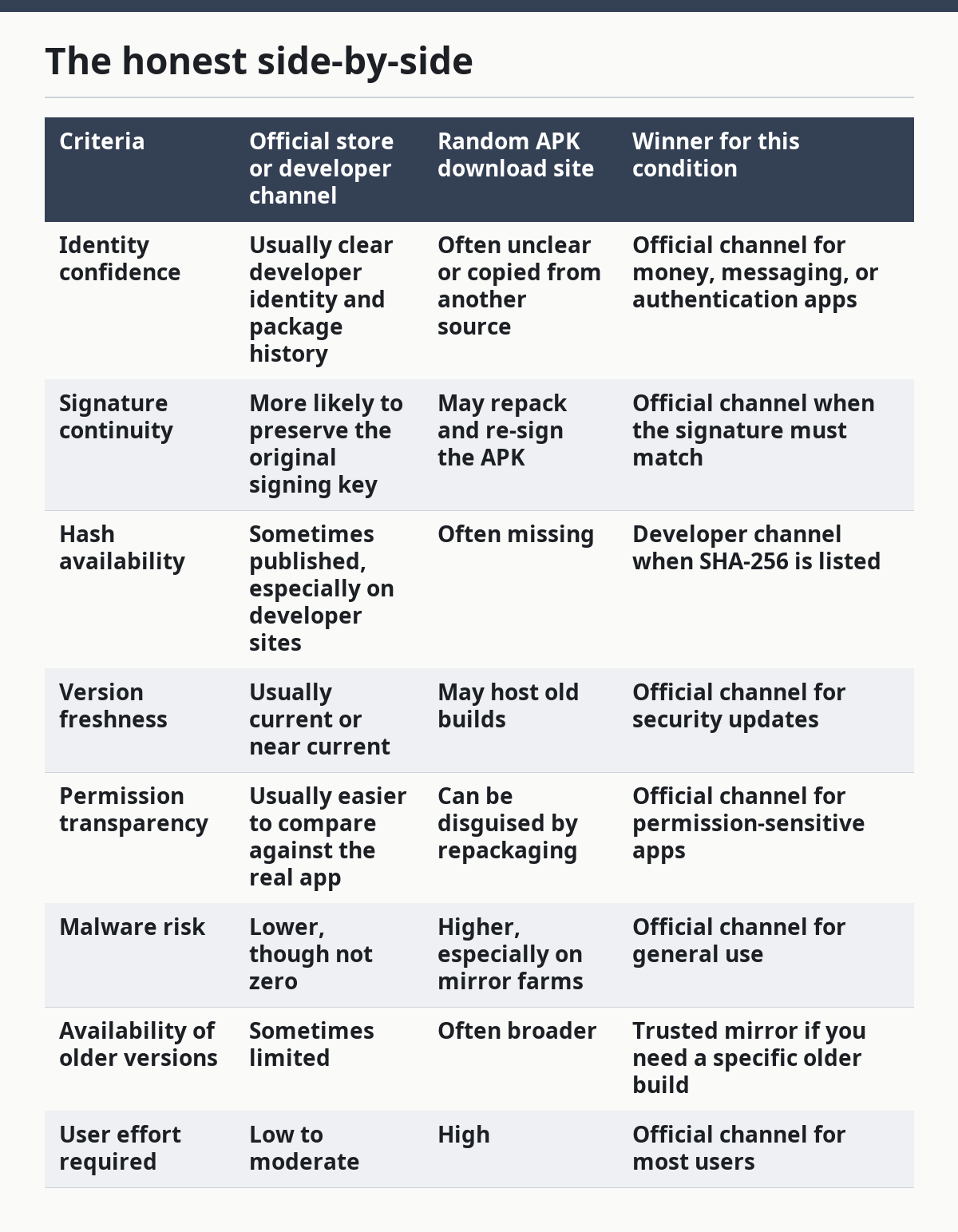
The table is not saying mirrors are always bad. It is saying the burden of proof moves onto the user the moment the file leaves the official channel. If the app is a password manager, a finance app, a corporate tool, or anything that can access sensitive data, the official route wins almost every time. The only reason to accept the extra work of a sideloaded APK is a concrete one: the app is unavailable, the device is unsupported, or you need a specific build for compatibility.
The drawback of the official route is access. Some apps are region-limited, removed from stores, or distributed only as APKs by the publisher. In those cases, the safety question becomes whether the developer’s own site gives enough evidence to trust the file. If it does not, the app is not worth the risk.
When should I skip an APK entirely?
You should skip an APK entirely when the file is for a sensitive app, the source is vague, or the app asks for permissions that do not fit its job. That is the line that protects you from clever packaging and lazy convenience.
Skip the download if the app handles banking, payments, crypto wallets, corporate email, passwords, two-factor codes, or healthcare data and you cannot verify the signature. These categories deserve the strongest provenance because the consequences are severe. If a fake flashlight app fails, you delete it. If a fake banking app succeeds, the recovery work can be serious and expensive.
Skip it if the file comes from a site that wraps the download in pushy pop-ups, password prompts, or “installer” tools that are unrelated to the APK itself. Those extras often matter more than the APK. They are a sign the site is trying to control the process, not simply distribute software.
Skip it if the APK is a “mod,” “cracked,” or “premium opened” build. Those are exactly the files most likely to be repackaged, and they almost always come with a trust problem. Even if the app seems to work, the hidden cost may be ad injection, tracking, or credential capture. The bargain is false.
Skip it if the file is a major downgrade from the current version and there is no clear reason for it. Older apps can lack security patches, fail certificate pinning, or depend on obsolete libraries. Compatibility is a real issue on Android, but old code should be a last resort, not a normal habit.
Which choice should I make?
Choose the official app store or the developer’s own download page if the app is mainstream, sensitive, or updated regularly. Choose a carefully verified APK from the developer or a reputable mirror only if the app is unavailable through normal channels and you can confirm the hash, signature, and package name. Neither if the site cannot prove where the file came from, the APK is a modded build, or the app controls money, messages, or authentication and the provenance is uncertain.
That is the clean rule. It is strict for a reason. APK sideloading is not dangerous because Android is broken; it is dangerous because it shifts trust from a platform review process to the user’s judgment. If the file’s origin and identity are clear, sideloading can be a practical answer. If they are not, the safest choice is to walk away.
The most useful mindset is not “can I install this?” but “can I prove this is the app I wanted?” If the answer is yes, you have done the work that matters. If the answer is no, no installer screen can fix that.
FAQ
Is an APK file safe if my antivirus says it is clean?
A clean scan is helpful, but it is not proof that the APK is safe. Antivirus tools can miss newly modified files, targeted malware, or repackaged apps that behave normally until after installation. A trusted source, matching signature, and correct hash matter more than a single scan result.
What is the most important thing to check before installing an APK?
The most important check is the signing certificate, because it confirms whether the file still belongs to the original developer identity. If the certificate changes unexpectedly, the APK may be repackaged or altered. After that, compare the hash if the publisher provides one.
Can I trust APKMirror or similar mirror sites?
A reputable mirror can be useful if it preserves the original signature and clearly documents the file’s provenance. The drawback is that you are still trusting a third party. If the mirror does not show enough evidence to verify the APK, treat it as untrusted.
Why does the package name matter?
The package name identifies the app at the Android system level, and copycat apps often use a lookalike name that is close but not exact. A mismatch can mean the app is not the original release, even if the icon and title look familiar. Package names are one of the fastest ways to catch impostors.
Should I install APKs for banking or password apps?
Only if the publisher is the official source and you can verify the APK’s identity without doubt. These apps are high-value targets, so the standard should be stricter than for a casual utility. If anything about the source, signature, or permissions is off, do not install it.
Drafted with AI; not yet reviewed by a person.